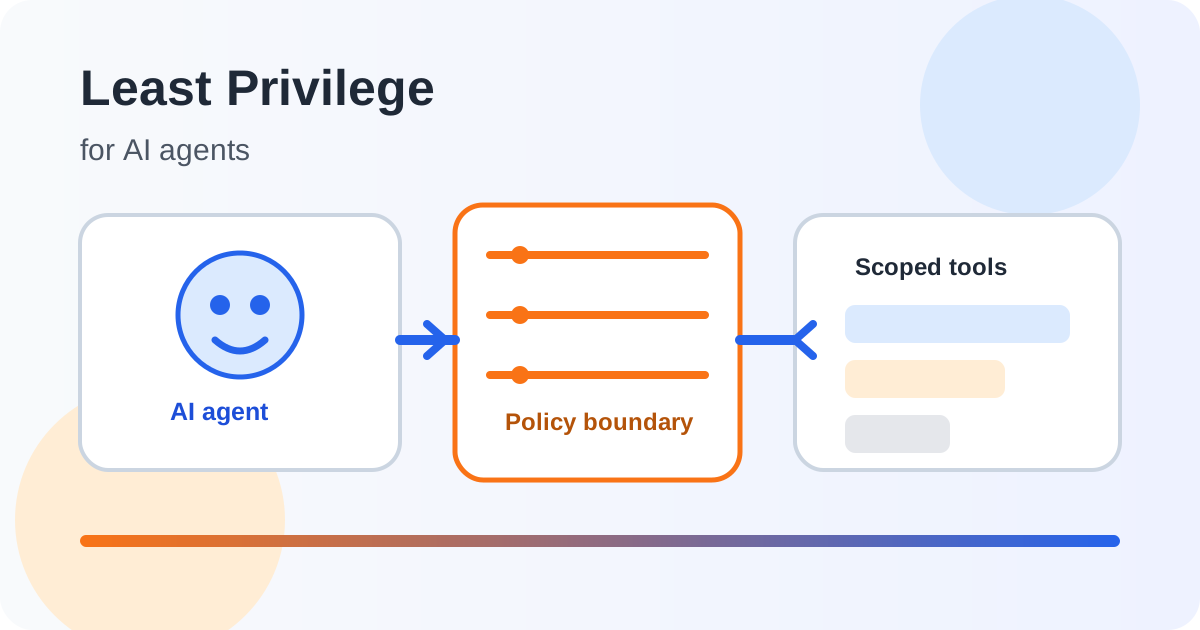
An AI agent becomes much more interesting when it can do things instead of only answering questions. It might read a ticket, search a knowledge base, create a calendar event, update a record or call an external API. That capability is useful, but it changes the security problem. A mistake in a chatbot response is usually just a bad answer. A mistake made by an agent with broad permissions can become a real system change.
The security principle that matters here is least privilege: give a user, process or system only the access it needs to perform its intended task, and no more. OWASP identifies excessive permissions, excessive functionality and excessive autonomy as common root causes of excessive agency in LLM-based applications. Least privilege is therefore not an optional hardening step for an agent. It is part of the boundary that determines what the agent can actually damage. OWASP’s Excessive Agency guidance describes the relationship directly.
What least privilege means for an AI agent
For a normal application, least privilege often means a service account can read one database or write to a small set of tables. For an AI agent, the same idea has to be applied to the agent’s tools, data, identities and actions.
An agent should not receive a general instruction such as “you can use the CRM.” It should receive a constrained capability such as “you can read the current customer’s support tickets” or “you can create a draft reply but cannot send it.” The difference is important because the model does not need to understand every security consequence of a tool call. The application enforcing the permission boundary must do that job.
OWASP’s authorization guidance similarly recommends enforcing least privilege, denying access by default and validating authorization on every request. These principles remain useful when an AI model is the component requesting an action. OWASP Authorization Cheat Sheet
Why broad AI permissions are dangerous
An AI agent can produce unexpected output because of ambiguous instructions, model errors, untrusted content or prompt injection. When the agent has no ability to change external state, the result may be limited to an incorrect response. When it has administrator-level access, the same uncertainty can become a security incident.
Consider an internal support agent that can search customer records, change account details and issue refunds. A user asks it to investigate a billing problem. A malicious document retrieved during that process contains instructions intended to manipulate the model. If the agent follows them, the important question is not only whether the model was fooled. It is also what the model was technically allowed to do.
If the agent could only read the relevant ticket and prepare a proposed response, the blast radius is small. If it could change billing records and approve refunds without another control, the same model failure has a much larger impact.
This is why least privilege works as a form of damage containment. It does not assume that the model will always behave perfectly. It assumes that important security boundaries must exist outside the model.
The four permission layers to control
Least privilege should be applied at several layers rather than through one giant permission setting.
1. Tool access
Give the agent only the tools needed for the task. If an agent needs to search documents, it does not automatically need a tool that deletes documents. If it needs to create a draft, it does not automatically need permission to publish it.
A useful design question is: “If this tool disappeared, could the agent still complete its intended job?” If the answer is yes, the tool may not belong in the agent’s default capability set.
2. Data access
Tool permission alone is not enough. A search tool might expose an entire database when the task only requires one customer’s records.
Scope data by tenant, user, project, document type, classification or another business boundary. The authorization decision should happen where the data is actually accessed, not only in the model prompt.
3. Action scope
Reading, drafting, changing and deleting are different risk levels. Treat them differently.
For example, an agent could be allowed to read an order and prepare a cancellation request, while a separate authorization step is required before the cancellation is committed. This separation makes the workflow safer without removing the useful automation.
4. Identity and credentials
Do not give an agent a permanent administrator credential just because it is convenient. Use narrowly scoped service identities, short-lived credentials where practical, and separate identities for different workloads.
The credential should represent the agent’s actual business function. If a scheduling agent only needs to create events in one calendar, its identity should not also be able to read unrelated mailboxes or modify organization-wide settings.
A safer agent architecture
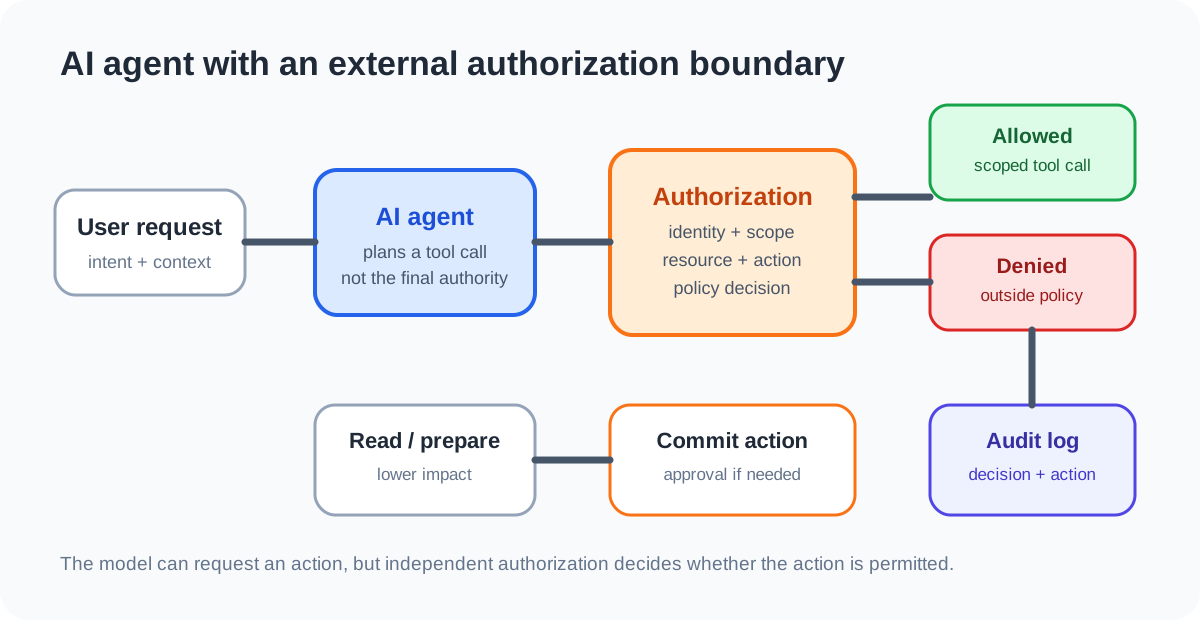
A practical architecture can place the model in the middle of a controlled execution path:
- The user provides an instruction.
- The agent reasons about which tool might be useful.
- A policy or authorization layer checks whether the requested tool and resource are allowed.
- The tool receives a narrowly scoped request and identity.
- High-impact actions can require human approval or a second authorization decision.
- The action and result are logged for later review.
The model can suggest an action, but the model should not be the final authority on whether the action is permitted.
This separation also helps with prompt injection. An attacker may be able to influence what the model asks for, but a properly enforced authorization layer can still reject an action outside the agent’s scope.
Use different permissions for different tasks
A common mistake is building one general-purpose agent and giving it every tool because future tasks might need them. This creates a large permission set that is difficult to reason about.
A better approach is to create task-specific capability profiles.
| Agent task | Useful access | Access that should usually be separate |
|---|---|---|
| Support triage | Read assigned tickets, search approved knowledge | Delete tickets, change billing |
| Report generation | Read approved reporting data | Change source records |
| Calendar assistant | Read availability, create events | Organization-wide admin settings |
| Code review assistant | Read repository, create review comments | Production deployment |
| Procurement assistant | Read approved catalog, prepare request | Approve payment |
These are examples, not universal permission sets. The correct boundary depends on the business process and the consequences of a mistake.
Do not rely on the system prompt as the permission boundary
A system prompt might say: “Never delete files.” That is useful as behavioral guidance, but it is not a reliable authorization control by itself.
If the underlying tool can delete files, another prompt, retrieved document, compromised integration or model error may eventually cause the model to request that operation. The tool should independently enforce whether deletion is allowed.
This distinction is similar to traditional application security. A frontend button being hidden does not secure an endpoint. Likewise, telling an AI agent not to use a dangerous capability does not make the capability safe if the backend still grants it.
Add approval where consequences are high
Least privilege does not mean every action must be blocked. Some actions can be automated safely when their impact is low and reversible. Others deserve a second decision.
A useful pattern is to divide actions into three groups:
- Read: generally low impact, but still subject to data authorization.
- Prepare: create a draft or proposed change without committing it.
- Commit: make an external change that may be difficult to reverse.
Human approval is particularly useful for high-impact actions such as financial transfers, account deletion, permission changes, production deployment or changes to security configuration. The exact threshold should be based on risk, not on whether the action happens to be performed by an AI system.
Monitor the agent’s effective permissions
Permission design can drift. A new integration may add a tool. A service account may gain another role. A developer may temporarily grant broad access and forget to remove it.
Log security-relevant tool calls, authorization decisions and high-impact actions. OWASP’s logging guidance recommends recording authentication and authorization failures and other higher-risk functionality in a way that supports detection and investigation. OWASP Logging Cheat Sheet
Review the logs for questions such as:
- Which tools does the agent actually use?
- Which permissions are never exercised?
- Which actions frequently require rejection?
- Which resources are being accessed outside the normal task context?
- Can a high-impact action be traced to a user, agent identity and approval decision?
Unused privileges are candidates for removal, while repeated denied actions may indicate either a legitimate workflow gap or an attempted misuse.
Least privilege is also an AI risk-management practice
NIST’s AI Risk Management Framework organizes AI risk work around Govern, Map, Measure and Manage. That structure is useful for agent permissions because access should be based on the system’s intended purpose and context, evaluated against risks, and reviewed as the system changes. NIST also emphasizes documenting system context, risks, controls and ongoing monitoring. NIST AI RMF
For an agent, that means starting with the job it is supposed to perform rather than the tools available in a platform. Map the resources and actions required. Measure whether the controls work. Manage the remaining risk and revisit permissions when the agent’s role or environment changes.
A practical checklist
Before giving an AI agent access to a real system, ask:
- What exact business task is the agent performing?
- Which data does it need to read?
- Which tools are genuinely required?
- Which actions are read-only, reversible or irreversible?
- Is authorization enforced outside the model?
- Is access scoped to the right user, tenant, project or resource?
- Are high-impact actions separated from routine actions?
- Can credentials be narrowed or made short-lived?
- Are important actions logged?
- Can access be revoked quickly?
- Have unused permissions been removed?
- What happens if the model is manipulated by untrusted content?
If the answer to several of these questions is unclear, the agent is probably being given capabilities faster than its security model is being designed.
The key idea
An AI agent does not need to be trusted with everything simply because it can reason about many things. Its authority should be smaller than its intelligence.
Least privilege gives the agent enough access to complete its intended task while limiting what happens when the model makes a mistake, follows malicious instructions or encounters an unexpected condition. The strongest design therefore puts the model inside a system of independent authorization, scoped identities, controlled tools, approval for high-impact actions and useful audit logs.
The goal is not to make an agent powerless. It is to make its power deliberate.