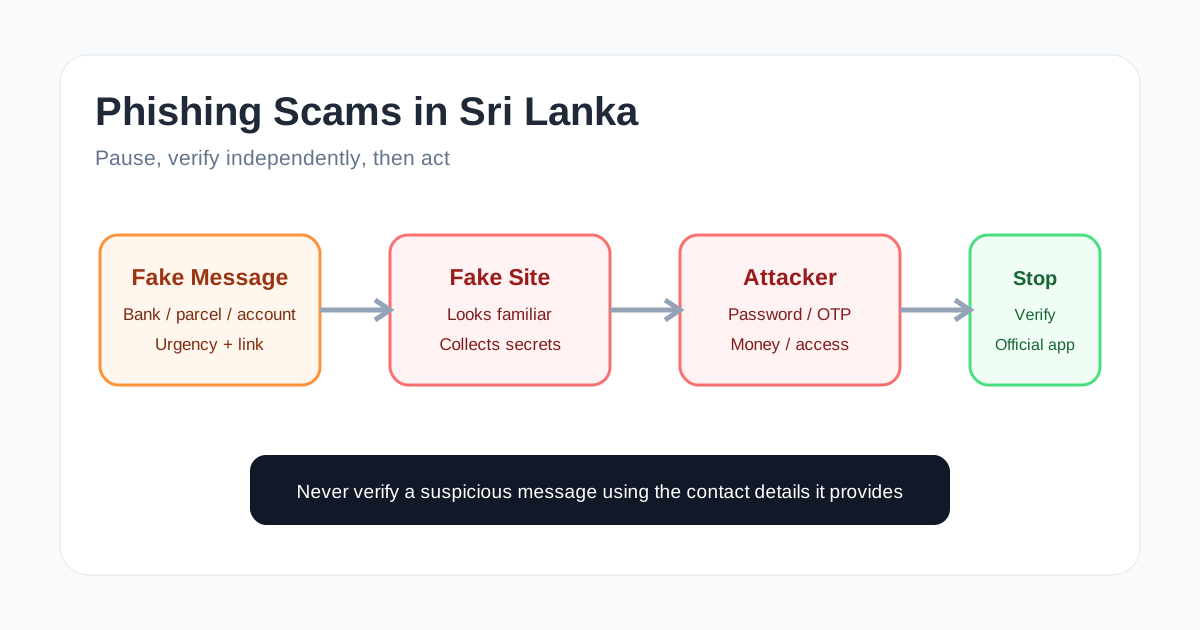
A message can look familiar enough to make you act before you think. It might claim that a bank account needs verification, a card has been blocked, a parcel is waiting, a payment failed or an account will be suspended. The message may use a familiar logo, a convincing name and a link that looks almost correct.
That is the basic strength of phishing: the attacker does not need to break the bank’s system if the victim can be persuaded to hand over the information.
Sri Lanka CERT currently maintains public scam-awareness material specifically targeting Sri Lankan users and provides an official incident-reporting route for cyber incidents. Its current reporting guidance also warns that personal financial fraud and scam matters should be submitted through its official incident reporting portal rather than the general CERT email address.
What a phishing scam is actually trying to achieve
A phishing message is usually designed to move you through a sequence of decisions very quickly:
- Make the message look relevant.
- Create urgency or fear.
- Give you an action to take.
- Send you to a fake or compromised destination.
- Collect information, money or access.
The final target might be a password, card details, an OTP, an email account, a social media account or a payment. Sometimes the attacker is not interested in the first account at all. They want access to another service that can be reached using the stolen credentials.
The important lesson is that a message does not become trustworthy because it contains your name, a familiar logo or information about a real service.
Common phishing themes in Sri Lanka
The exact wording changes constantly, but several themes are easy to recognise.
Fake bank or card alerts
A message may claim that your account, debit card or online banking access has been suspended or needs verification. The attacker wants you to click a link and enter credentials or financial information.
A genuine-looking page is not proof that the request is genuine. Attackers can reproduce colours, logos, layouts and common wording surprisingly well.
Fake payment or refund messages
A scam may say that a payment failed, a refund is waiting, or an account must be verified before a transfer can complete. The emotional trigger is usually money that appears to be at risk or money that appears to be waiting for you.
Parcel and delivery scams
Messages about deliveries can be effective because many people are genuinely expecting parcels. A small request for a delivery fee or address confirmation can be used to send the victim to a fake payment page.
Account suspension warnings
An attacker may claim that a social media, email, banking or other account will be closed unless the user acts immediately. The urgency is part of the attack, not evidence that the warning is real.
Fake support or verification messages
A message can also impersonate customer support and ask you to “confirm” an account, share a code or contact a number controlled by the attacker.
The five-second check
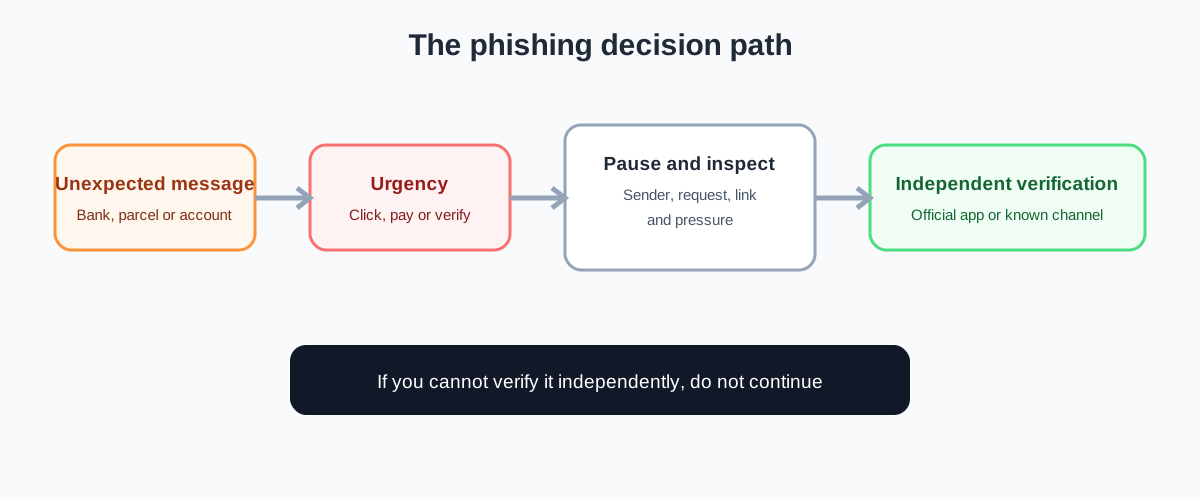
When a suspicious message arrives, do not start by asking whether it looks professional. Start by asking whether you expected the communication and whether you can verify it independently.
A useful quick check is:
- Sender: Is the address, number or account actually associated with the organisation?
- Request: Is it asking for a password, OTP, card details, payment or urgent action?
- Link: Does the real destination belong to the organisation, or is it a lookalike domain?
- Pressure: Is the message trying to make you act before you think?
- Verification: Can you open the official app or type the official website yourself instead?
One suspicious sign may be enough to stop. You do not need to prove that a message is malicious before deciding not to follow it.
Why OTPs are especially important
A one-time password is often treated as harmless because it expires. That is a mistake.
An OTP can be the final step in an authentication or transaction process. If an attacker has already captured a password through a fake login page, the OTP may be the missing piece they need at that moment.
Never share an OTP because a caller, chat message or support representative tells you to. If you receive an authentication code for an action you did not initiate, treat it as a warning signal and investigate through the official service.
Multi-factor authentication is valuable protection, but the strength of the second factor matters. CISA recommends moving toward phishing-resistant MFA where possible because some methods are easier for attackers to trick than others.
Do not verify a suspicious message by using the message itself
This is one of the most useful habits to develop.
If an SMS says your bank account is locked and gives you a phone number, calling that number does not independently verify the claim. If an email says your account needs verification and provides a link, clicking that link does not verify the email.
Use a separate route instead:
- open the bank’s official mobile application;
- type the organisation’s known website address yourself;
- use a phone number printed on an official card or statement;
- contact the organisation through a known official channel.
The verification path must be independent of the suspicious message.
How fake websites fool people
A phishing site does not need to look perfect. It only needs to look convincing for long enough to collect the information the attacker wants.
Look carefully at the actual domain name. A page can display the correct logo while being hosted on an unrelated domain. Attackers may use extra words, misspellings, unusual subdomains or domains that resemble the real organisation.
Also remember that HTTPS does not prove that a website is legitimate. HTTPS helps protect the connection between your browser and the website. It does not tell you that the website owner is trustworthy.
What to do if you clicked the link
Do not panic, but do not ignore it either.
If you opened the page but entered nothing, close it and avoid downloading anything. If you entered a password, change that password through the genuine service and change it anywhere else you reused it. If you supplied banking information or approved an unexpected transaction, contact the relevant financial institution through an official channel as quickly as possible.
If an email account may have been compromised, review recent sign-ins, sessions, recovery details and forwarding rules. If a social account is involved, use its official account-recovery and security tools.
If money has already been transferred, speed matters. Contact the relevant bank or payment provider immediately and preserve messages, transaction details, phone numbers, URLs and screenshots as evidence.
For Sri Lankan cyber incidents, Sri Lanka CERT currently lists its 101 hotline and an official online incident-reporting portal. Its current guidance specifically directs social-media incidents and financial fraud or scam matters to the official reporting portal rather than cert@cert.gov.lk.
What not to do after a scam
A second scam can follow the first one. Someone may contact you claiming they can recover your money, remove malware or investigate the attacker for a fee.
Do not give another stranger your passwords, OTPs or remote access simply because they know you were scammed. Verify any support organisation independently before continuing.
Also avoid deleting evidence immediately. Keep the original message, sender details, payment references, URLs and relevant screenshots where safe to do so.
A safer everyday habit
The strongest defence against phishing is not memorising every scam format. It is building a repeatable verification habit.
When a message creates urgency, stop. Do not click first and investigate later. Open the trusted app or website separately and check whether the claimed problem actually exists.
This small pause breaks the attacker’s preferred sequence: message, panic, click, credential theft.
Practical checklist for Sri Lankan users
Before acting on an unexpected bank, payment, parcel or account message, ask:
- Did I actually expect this message?
- Is the sender independently verifiable?
- Is it asking for a password, OTP, card details or payment?
- Does the link lead to the genuine organisation?
- Is the message creating unusual urgency?
- Can I verify the claim inside the official app?
- Can I contact the organisation using a number or website I already trust?
If you cannot independently verify the request, do not continue with it.
The main lesson
Phishing works because the attacker controls the story, not because the story is technically sophisticated. A fake bank message can be convincing without having any access to the bank’s internal systems.
For Sri Lankan users, the practical defence is simple: slow down, verify through an independent official channel, never disclose passwords or OTPs because of an unexpected request, and act quickly through legitimate support channels if money or credentials have already been exposed.
A suspicious message does not deserve your trust just because it looks professional. Make verification the step that happens before the click.