A secure AI chatbot is not created by writing a stronger system prompt. The chatbot is an application with a model inside it, and the security boundary includes everything around that model: authentication, conversation state, retrieved data, APIs, tools, rendering, logging, rate limits and operational controls.
That distinction matters because a model can be manipulated, can produce incorrect output, and may process data that carries a different trust level from the user’s request. OWASP’s current Top 10 for LLM Applications identifies prompt injection, sensitive information disclosure, improper output handling and excessive agency as separate risks. NIST’s Generative AI Profile similarly treats generative AI risk as a lifecycle problem that should be governed, measured and managed across the system rather than reduced to one technical safeguard.
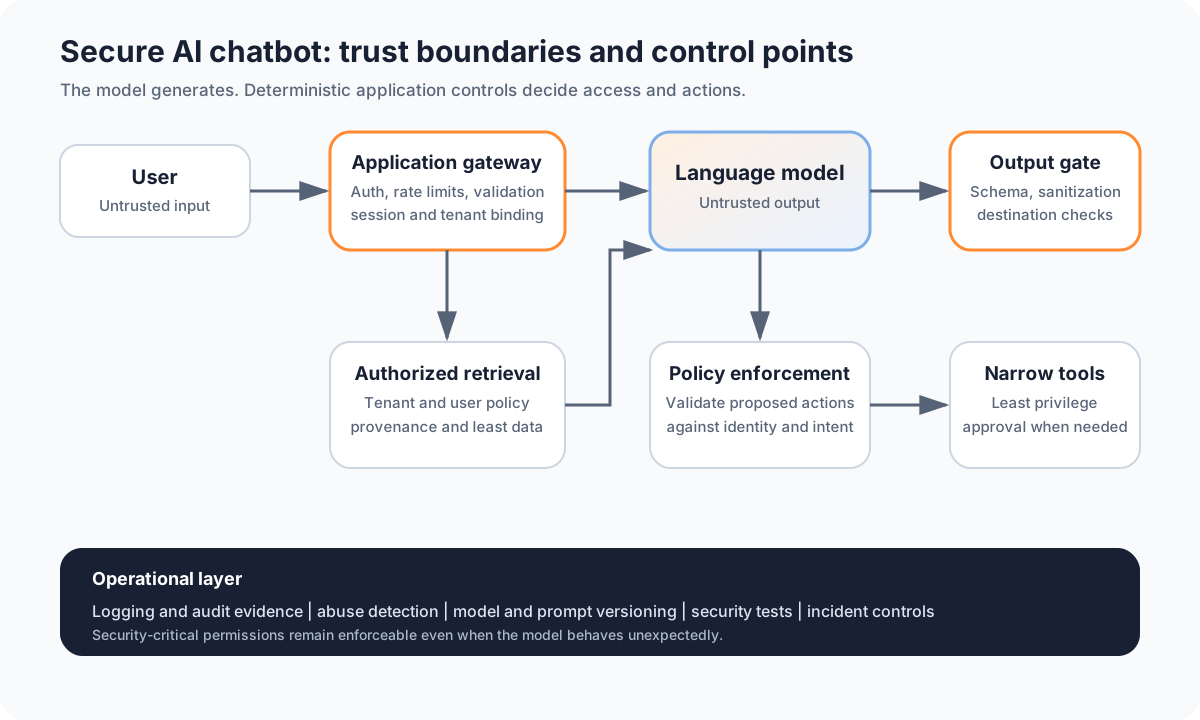
A useful design principle is therefore simple: let the model generate language, but keep security decisions in deterministic application controls.
Start with a threat model, not a prompt
Before choosing guardrails, write down what the chatbot can actually reach. A public FAQ bot that answers from public documentation has a very different risk profile from an internal assistant that can search confidential files or send email.
At minimum, identify:
- who can use the chatbot;
- what data the chatbot can read;
- what data can enter prompts or retrieval context;
- whether conversations persist across sessions;
- which external services the system calls;
- whether the model can trigger tools or actions;
- what the browser will render from model output;
- what is logged and retained;
- which failure would cause meaningful harm.
This exercise exposes the real trust boundaries. It also prevents a common mistake: adding a broad set of security filters without first deciding what the application must protect.
1. Authenticate users before giving them private context
If the chatbot exposes personal, tenant-specific or internal information, the application must establish the user’s identity before retrieving that information. The model should not infer identity from the conversation, an email address typed into the prompt, or a user-supplied account number.
Use the application’s normal authentication mechanism and pass a trusted user or tenant identifier into the backend. Then enforce access control when data is retrieved.
For example, if a user asks, “show my latest support ticket,” the secure flow is not:
Prompt -> model decides whose ticket to fetch -> databaseIt should be:
Authenticated session -> policy check -> authorized data retrieval -> model receives allowed dataThe model can explain the result, but it should not decide whether the user is entitled to see it.
2. Treat every prompt as untrusted input
User messages are untrusted by definition. So are documents, web pages, emails, uploaded files and tool responses that may be inserted into the model’s context.
OWASP LLM01:2025 explains that prompt injection can alter model behavior in unintended ways. Importantly, the malicious instruction does not have to arrive directly from the person using the chatbot. It can be hidden in content the application retrieves or processes.
A system prompt should clearly separate instructions from data, but prompt wording alone is not a complete defense. Use structured boundaries and reduce the amount of untrusted context the model receives.
A simple conceptual format is:
SYSTEM POLICY
Follow the application rules below.

UNTRUSTED USER CONTENT
<user message>

UNTRUSTED RETRIEVED CONTENT
<authorized retrieved text>

TASK
Answer the user's permitted request using the available evidence.
This makes the intended roles explicit. It does not make injection impossible, so important permissions must still be enforced outside the model.
For a deeper explanation of this attack class, see Prompt Injection Explained and Indirect Prompt Injection.
3. Minimise sensitive data before it reaches the model
The safest sensitive field is the one the model never receives.
OWASP LLM02:2025 covers sensitive information disclosure involving personal data, financial details, credentials, confidential business information and other protected content. A chatbot can leak information because too much data was placed in its context, because access control was weak, or because output exposed information to the wrong user.
Before sending data to a model, ask whether each field is actually required for the task. Where possible:
- remove secrets and API keys;
- mask or tokenize unnecessary identifiers;
- retrieve only the records the user is authorised to access;
- avoid placing entire documents in context when a small authorised section is enough;
- separate tenants before retrieval, not after generation;
- define retention rules for prompts and responses;
- verify the model provider’s current data-use and retention options for the deployment you use.
Do not use a prompt instruction such as “never reveal confidential data” as a replacement for access control. If the model should never see another tenant’s data, prevent that data from entering the context in the first place.
4. Protect conversation and session boundaries
Chat history is application state. It may contain private information and can influence future responses.
Do not let one user’s conversation state become available to another user because of weak cache keys, shared memory, insecure identifiers or backend bugs. Session identifiers should be generated securely and associated with the authenticated principal on the server side.
If you support long-term memory, treat it as a separate data store with its own authorization, retention and deletion controls. A remembered preference is not automatically harmless. Persistent memory can contain sensitive data or poisoned instructions that affect later conversations.
5. Keep secrets outside prompts and source code
API keys, database passwords and service credentials should live in a proper secrets-management mechanism or protected deployment environment, not in system prompts, client-side JavaScript, Markdown files or source-control history.
The browser should normally call your backend, and the backend should call the model provider. Putting a model API key directly into frontend code exposes it to users and automated abuse.
Use separate credentials for development and production, restrict their scope where the provider allows it, rotate them when exposure is suspected, and monitor unusual usage.
6. Validate model output for its destination
Model output is untrusted output. OWASP LLM05:2025 warns that improper output handling can become a path to vulnerabilities when generated content is passed directly into browsers, shells, databases, files or other downstream components.
The correct validation depends on where the output goes.
| Destination | Unsafe assumption | Safer control |
|---|---|---|
| Web page | “The model returned Markdown, so it is safe” | sanitize rendered HTML and restrict dangerous links or embeds |
| Database | “The model produced valid SQL” | use parameterized queries and an application-controlled query layer |
| Shell | “The command looks reasonable” | avoid open-ended shell execution; expose narrow approved operations instead |
| API call | “The JSON parses” | validate schema, allowed values, identity and authorization |
| File path | “The model chose a filename” | constrain to an approved directory and validate the path |
If the chatbot only needs to display plain text, keep the rendering path simple. Every additional output feature, such as raw HTML, external images, executable code or automatic tool calls, adds another attack surface.
7. Put tools behind a policy enforcement layer
A chatbot becomes much more powerful when it can send messages, modify records, create files, make purchases or call administrative APIs. That power should never come directly from the model’s confidence.
OWASP LLM06:2025 describes excessive agency as a problem of excessive functionality, permissions or autonomy. Its guidance recommends minimising extensions, permissions and open-ended capabilities, and enforcing authorization in downstream systems.
A secure tool path should look like this:
Model proposes action
        |
        v
Schema validation
        |
        v
User and tenant authorization
        |
        v
Policy and risk check
        |
        v
Human confirmation when required
        |
        v
Narrow tool executes
The model may propose create_support_ticket, for example, but ordinary code should verify that the authenticated user may create the ticket, that each field is valid, and that the tool cannot silently perform unrelated actions.
Avoid generic tools such as “run any shell command” or “call any URL” when a small purpose-built function is sufficient.
8. Design RAG as an authorization problem too
Retrieval-Augmented Generation can improve factual grounding, but it does not automatically make a chatbot secure. Similarity search answers “what content is relevant?” It does not answer “what content is this user allowed to see?”
For private knowledge bases, preserve permission metadata during ingestion and chunking, then filter retrieval using the authenticated user’s access rights before the text reaches the model.
Treat retrieved documents as untrusted content because they can also carry indirect prompt injection. The full design is covered in How to Secure a RAG Application.
9. Add abuse controls around the model endpoint
A production chatbot is also a network service. It needs conventional application-security controls.
Use authentication where appropriate, request-size limits, rate limiting, sensible model-token limits and quotas that match the service. Validate file types and sizes for uploads. Protect administrative endpoints separately. Apply normal web controls such as secure session handling, CSRF protection where relevant, CORS restrictions, dependency management and secure error handling.
OWASP LLM10:2025 calls out unbounded consumption as a distinct risk for LLM systems. Resource limits are therefore both an availability and cost-control measure.
10. Log security decisions without creating a new data leak
Useful telemetry should help answer what happened without unnecessarily copying every sensitive prompt into long-term logs.
Record identifiers and security decisions such as:
- authenticated user or tenant ID where appropriate;
- request and conversation IDs;
- model and prompt-template version;
- retrieval source IDs rather than full documents where possible;
- guardrail or validation result;
- requested tool and authorization decision;
- confirmation result for privileged actions;
- rate-limit or abuse events;
- errors and blocked requests.
Protect logs with access control and retention rules. If raw prompts must be retained for a defined operational purpose, treat them as potentially sensitive data.
11. Separate safety filters from authorization
Content moderation and safety classifiers can be useful, but they answer different questions from access control.
A safety filter might decide that a generated response violates a content policy. It should not decide whether User A may read User B’s document. Similarly, a prompt-injection detector may flag suspicious input, but it should not be the only barrier protecting an administrative API.
Security is stronger when each control has one clear job:
- identity establishes who is making the request;
- authorization decides what that identity may access or do;
- input controls reduce malformed or suspicious content;
- model guardrails shape model behavior;
- output validation protects downstream systems;
- approval gates protect high-impact actions;
- monitoring helps detect abuse and failures.
This separation makes failures easier to understand and test.
12. Test the chatbot as a system
A normal functional test asks whether the chatbot gives a good answer. A security test asks what happens when a user, document, model output or tool call behaves adversarially.
Build regression tests for cases such as:
- direct attempts to override the system policy;
- indirect instructions hidden in retrieved content;
- requests for another user’s or tenant’s data;
- malicious Markdown or HTML in model output;
- unexpected tool names or parameters;
- attempts to make a read-only assistant perform writes;
- repeated high-cost requests;
- oversized uploads or context flooding;
- stale sessions and revoked permissions;
- deletion of a knowledge source that should no longer be retrievable.
The purpose is not to prove the chatbot is impossible to manipulate. It is to verify that a model failure cannot automatically become an authorization failure, data leak or dangerous real-world action.
If you are building a formal testing programme, What Is AI Red Teaming? provides a broader methodology.
A practical secure chatbot control map
| Layer | Main security question | Minimum control |
|---|---|---|
| Identity | Who is using the chatbot? | trusted authentication and session binding |
| Input | What can enter the model context? | validation, size limits and trust separation |
| Data | What private information may be used? | least-data retrieval and deterministic access control |
| Prompt | Can untrusted text change behavior? | structured instruction boundaries and defense in depth |
| Model | Which model and configuration are active? | version tracking and controlled deployment changes |
| Output | Where will generated content go? | destination-specific validation and sanitization |
| Tools | What can the chatbot do? | narrow functions, least privilege and complete mediation |
| RAG | Which sources may this user retrieve? | authorization-aware retrieval and provenance |
| Operations | Can abuse be detected and contained? | logging, rate limits, alerts and incident procedures |
| Testing | Do controls survive adversarial inputs? | repeatable security and regression tests |
Pre-production checklist
Before exposing an AI chatbot to real users or private data, verify that:
- the system has a written threat model and data-flow diagram;
- private data is only retrieved after authentication and authorization;
- user input and retrieved content are treated as untrusted;
- secrets are kept out of prompts, frontend code and source control;
- conversation history and memory are isolated per authorised user or tenant;
- sensitive fields are minimised before model calls;
- model output is validated for its actual destination;
- rendered Markdown or HTML is sanitised;
- tool calls use strict schemas and narrow functions;
- downstream systems independently enforce authorization;
- privileged or irreversible actions have an appropriate confirmation step;
- RAG retrieval preserves source permissions and provenance;
- rate, size, token and upload limits exist;
- security logs avoid unnecessary sensitive content;
- model, prompt and policy versions are traceable;
- direct and indirect prompt-injection tests are included in regression testing;
- cross-user and cross-tenant access tests are included;
- incident response includes the ability to disable tools, revoke credentials and isolate risky integrations.
Secure AI chatbots are secure applications first
The model is important, but the strongest controls usually sit around it. Identity should be established by the application. Data access should be enforced by deterministic policy. Tools should have narrow permissions. Output should be validated before another system trusts it. High-impact actions should require stronger approval than a model deciding that an instruction “looks right.”
This design accepts a practical reality: prompt injection and model mistakes cannot be treated as impossible events. The goal is to make sure that when the model behaves unexpectedly, the rest of the application still protects data, permissions and downstream systems.
Sources and further reading
- OWASP LLM01:2025 Prompt Injection
- OWASP LLM02:2025 Sensitive Information Disclosure
- OWASP LLM05:2025 Improper Output Handling
- OWASP LLM06:2025 Excessive Agency
- OWASP LLM Prompt Injection Prevention Cheat Sheet
- NIST AI 600-1: Artificial Intelligence Risk Management Framework, Generative Artificial Intelligence Profile