Security misconfiguration is one of those risks that looks simple until you examine a real application. The software may be correctly written, authentication may work, and no obvious coding vulnerability may exist, yet the system can still be exposed because a service, framework, database, cloud resource or security feature was configured badly.
OWASP ranks Security Misconfiguration as A02 in the OWASP Top 10:2025, up from fifth place in the previous edition. OWASP reports that every application in the tested dataset had some form of misconfiguration, which helps explain why the category remains so important. The risk is broad because modern applications depend on many configurable layers: web servers, frameworks, containers, cloud services, databases, APIs, identity systems and third-party platforms.
The key idea is simple: a secure feature only protects you if it is configured securely.
What security misconfiguration actually means
A security misconfiguration happens when a system is deployed with settings that weaken its intended security posture. That can mean leaving a dangerous default in place, enabling a feature that is not needed, assigning excessive permissions, exposing sensitive diagnostic information, failing to apply secure headers, or allowing a cloud resource to become public.
This is different from a coding flaw such as SQL injection. In a coding flaw, the application logic itself is unsafe. In a misconfiguration, the system may already have a secure option available, but the option was not enabled, was configured incorrectly, or was overridden later.
A single application can also accumulate configuration mistakes over time. A temporary debug setting can survive into production. A storage bucket can become public during troubleshooting. A new service can be enabled without firewall rules being reviewed. A framework upgrade can introduce a new secure option that remains disabled for compatibility.
That is why configuration security needs a repeatable process rather than a one-time checklist.
Common examples of security misconfiguration
1. Default accounts and passwords remain enabled
Products often ship with an initial administrator account or setup password. If a universal default credential remains active after deployment, an attacker may not need to discover a vulnerability at all. They only need to know the default.
CISA has repeatedly warned manufacturers against shipping products with widely shared default passwords. Its Secure by Design guidance recommends safer approaches such as unique initial credentials or requiring the user to create a password during setup.
For application teams, the lesson is broader: every default account, key, sample user and temporary credential should be reviewed before production.
2. Unnecessary services, ports or features are exposed
A server may run far more software than the application actually needs. Administrative panels, development endpoints, sample applications, test frameworks and network services increase the attack surface.
If a service has no business purpose, disabling or removing it is usually safer than trying to maintain and monitor it forever.
This idea is often called minimizing the attack surface. A smaller system is easier to harden because there are fewer components, fewer permissions and fewer settings that can fail.
3. Debug mode is left on in production
Debugging information is useful during development, but dangerous when exposed publicly. Detailed error pages can reveal:
- file system paths;
- framework versions;
- internal hostnames;
- database details;
- source-code fragments;
- stack traces;
- environment information.
An attacker can combine these details with other weaknesses. Good production error handling should give users a safe message while recording diagnostic details in protected logs.
4. Cloud storage is accidentally public
Cloud platforms make it easy to create storage buckets, databases and object stores, but the permission model can be complex. A mistaken access policy may expose files that were intended to be private.
The same problem appears in many forms: public object storage, databases reachable from the internet, overly broad identity roles, unrestricted security groups, or secrets stored in publicly readable configuration.
A cloud service is not automatically secure simply because the provider operates the infrastructure. Customers still need to configure identities, network rules, storage permissions and service policies correctly.
5. Excessive permissions are assigned
Suppose an application only needs to read one storage bucket but its cloud identity has administrator access across the account. The application may work perfectly, but the configuration creates a much larger impact if the application is compromised.
This is why least privilege matters. Permissions should match the smallest set of actions and resources the component genuinely needs.
This principle connects directly to Broken Access Control and IDOR and BOLA. Access control is not only about application code. Infrastructure identities and service permissions matter too.
6. Security headers are missing or weak
Browsers support security directives that can reduce certain classes of web attacks. Examples include Content Security Policy, HTTP Strict Transport Security and controls around framing and MIME-type interpretation.
Missing headers do not always create an exploitable vulnerability by themselves, but they can remove useful layers of defense. The correct policy depends on the application, so blindly copying a header set from another website is not enough.
7. Unpatched or insecure components remain configured
Misconfiguration and patching often overlap. A platform may support a stronger security mode, but an old compatibility setting keeps the weaker option enabled. A service may still expose a deprecated protocol. A framework may have a security feature that requires explicit configuration after an upgrade.
OWASP specifically recommends reviewing configuration as part of patch and upgrade processes instead of assuming updates automatically create a secure state.
A practical example: secure and insecure deployment
Imagine a small web application deployed on a cloud virtual machine.
An insecure setup might look like this:
| Area | Weak configuration | Better configuration |
|---|---|---|
| Admin access | Management port open to the internet | Restrict management access to trusted networks or a secure access path |
| Application | Debug mode enabled | Production error handling with protected logs |
| Database | Publicly reachable | Private network access only where possible |
| Identity | Application uses account-wide admin role | Application gets only required permissions |
| Storage | Bucket allows public reads | Private by default with explicit access rules |
| Services | Sample apps and unused services installed | Remove unnecessary components |
| Credentials | Default or shared setup password | Unique credential, rotated and protected |
Notice that none of these improvements requires changing the application’s core business logic. The security improvement comes from reducing exposure and making the environment predictable.
Why configuration drift is dangerous
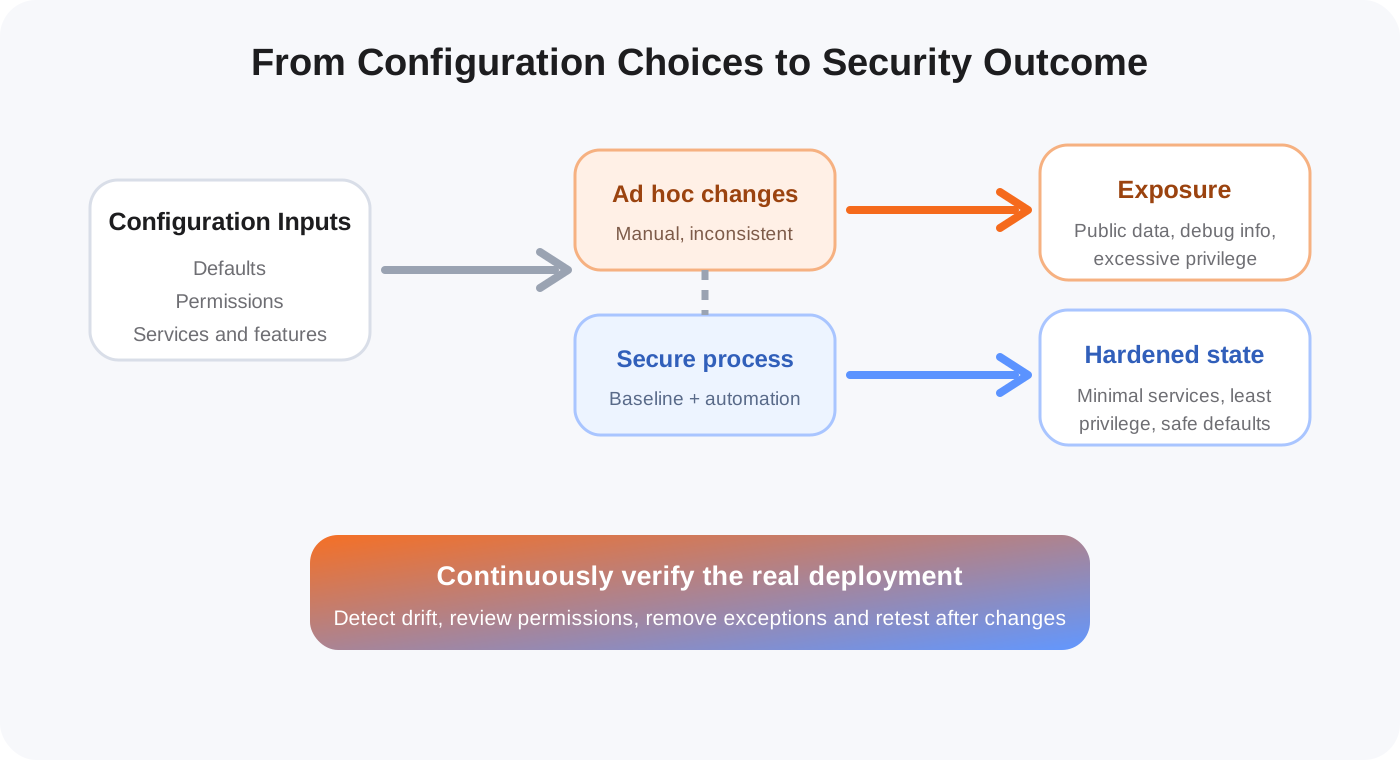
Even if the first production deployment is secure, systems change. Someone modifies a firewall rule during troubleshooting. A new environment is created manually. A temporary exception is never removed. Development and production slowly become different.
This is called configuration drift.
The strongest way to reduce drift is to make secure configuration reproducible. Instead of relying on a person to remember every setting, define the desired state in version-controlled configuration, infrastructure-as-code, deployment templates or automated policy checks where practical.
NIST’s Secure Software Development Framework emphasizes integrating secure practices throughout the software life cycle rather than treating security as a final-stage activity. That mindset fits configuration management well because secure deployment should be repeatable, reviewable and maintainable.
How to prevent security misconfiguration
Build a hardening baseline
Start by defining what a secure deployment should look like. The baseline should include operating-system settings, application configuration, identity permissions, network exposure, logging, security headers, cloud policies and secrets handling.
The goal is not to create one giant document that nobody reads. The goal is to create a standard that teams can actually reproduce.
Automate repeatable configuration
Manual configuration is difficult to audit and easy to forget. Where possible, automate environment creation and security settings.
For example, infrastructure-as-code can define network rules and cloud permissions. Configuration management can enforce server settings. CI/CD checks can reject obviously dangerous values before deployment.
Automation does not make configuration automatically secure, but it makes mistakes easier to review and consistent fixes easier to distribute.
Separate environments properly
Development, testing and production may use similar configuration structures, but they should not share sensitive credentials or unrestricted access.
A test environment should not become a back door into production. Production secrets should not appear in local development files. Administrative interfaces should not be exposed simply because they were useful during testing.
Remove what you do not need
Every unnecessary component creates maintenance work and possible exposure. Remove sample applications, unused packages, dormant accounts, extra services and legacy protocols when they are not required.
This is one of the most practical security improvements because it reduces both attack surface and configuration complexity.
Review permissions regularly
Permissions tend to grow. A developer grants extra access to solve a problem, the system starts working, and the permission is never reduced.
Review cloud roles, API scopes, service accounts, database users and storage policies periodically. Ask a simple question: does this identity still need every permission it currently has?
Validate production settings automatically
Security tests should include configuration checks, not only source-code scanning.
Useful checks can include:
- whether debug mode is disabled;
- whether administrative ports are exposed;
- whether storage is public;
- whether security headers are present;
- whether default accounts remain active;
- whether secrets are committed into configuration files;
- whether cloud identities have excessive privileges;
- whether unsupported protocols or services are enabled.
Many of these checks can run continuously because configuration changes more often than teams realize.
Prefer secure defaults
CISA’s Secure by Design work makes an important point: security should not depend on every customer remembering to fix insecure defaults. Software producers should make the safer state the default where possible.
For internal development teams, the same principle applies. New services, templates and environments should start from hardened defaults rather than requiring engineers to manually add security later.
Configuration security is a process, not a setting
A common mistake is to think of hardening as a checklist completed before launch. In reality, configuration changes throughout the life of a system.
New application versions introduce settings. Cloud providers add services. Access requirements change. Engineers troubleshoot incidents. Teams migrate infrastructure. Each change can introduce a new mismatch between the intended security design and the real deployment.
A mature approach therefore combines three ideas:
- Define the desired secure state.
- Deploy it consistently.
- Continuously verify that the real system still matches it.
That is more reliable than depending on memory or manual review alone.
Final perspective
Security misconfiguration is dangerous because it can turn ordinary functionality into unintended exposure. The weakness may be a default password, a public bucket, an unnecessary service, a permissive role or a verbose error page. Individually these settings can look small, but together they define the real security boundary of an application.
The most effective response is not to memorize every possible bad setting. Build a repeatable hardening process, minimize what is enabled, use least privilege, automate configuration where possible and continuously check whether production still matches the intended secure state.
That approach turns configuration from an informal deployment task into part of the security architecture itself.