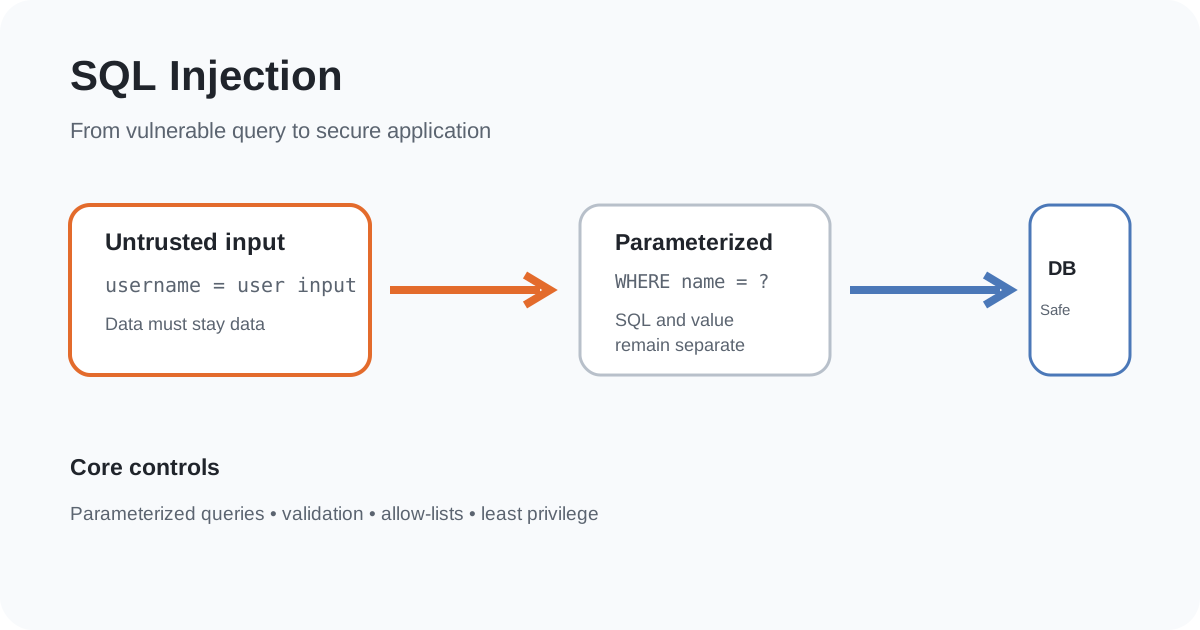
SQL injection is one of the clearest examples of what happens when an application confuses data with instructions.
A user enters a value into a web form. The application places that value into a database query. If the query is constructed unsafely, specially crafted input can change the meaning of the SQL statement instead of being treated as ordinary data.
That can expose records, alter data, bypass application logic or, depending on the database and permissions, cause more serious damage.
The important lesson is not to memorise a particular attack string. It is to understand the design mistake and remove the attacker’s ability to turn input into SQL code.
What is SQL injection?
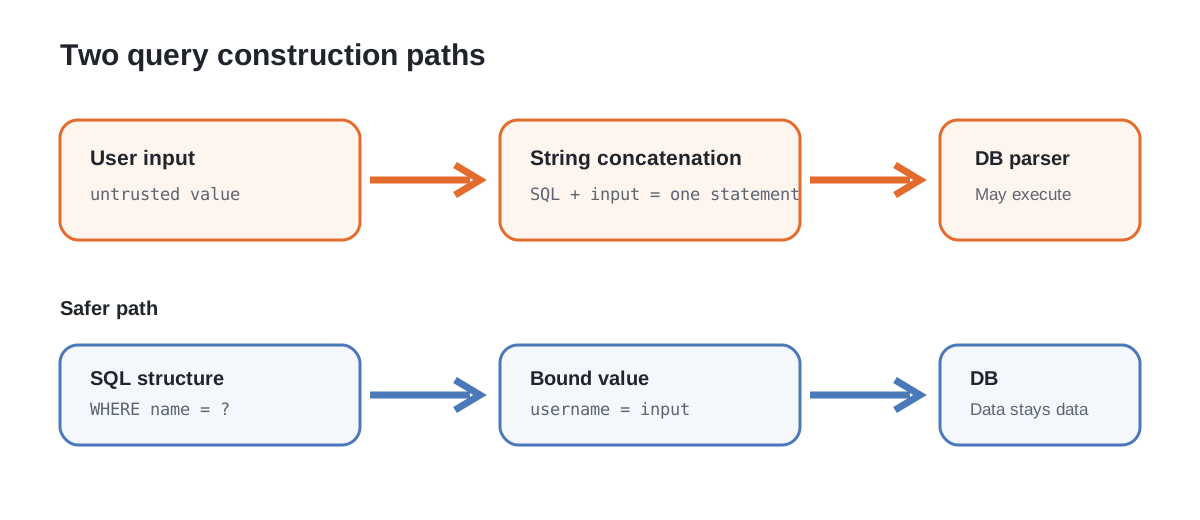
SQL injection occurs when untrusted input is incorporated into a SQL statement in a way that lets the input influence the statement’s structure.
A simplified vulnerable pattern looks like this:
query = "SELECT * FROM users WHERE username = '" + username + "'"The application intends username to be data. But string concatenation makes the final SQL statement depend on the syntax contained in the input.
OWASP identifies dynamically constructed queries that concatenate user input as a primary cause of SQL injection. Its main recommendation is to stop building SQL this way and use parameterized queries instead. citeturn0search2
Why the database cannot simply know what the developer meant
A database receives a SQL statement, not the programmer’s intention.
Consider a normal query:
SELECT * FROM users WHERE username = 'alice';The database parses this as SQL code containing a string value.
Now imagine that application code directly inserts an untrusted value containing quote characters and SQL syntax. The resulting statement may contain additional operators or clauses. From the database’s perspective, it is still a SQL statement.
This is why input filtering alone is a poor foundation. The application should make the boundary between SQL instructions and user data explicit.
The safest general pattern: parameterized queries
With a parameterized query, the SQL structure is defined separately from the values.
For example, a PHP application using PDO can use:
$stmt = $pdo->prepare(
    'SELECT id, username FROM users WHERE username = :username'
);

$stmt->execute(['username' => $username]);

$user = $stmt->fetch();
The exact API differs between languages and database libraries, but the security property is the same: the database driver receives the SQL structure and the value as separate things.
OWASP describes prepared statements with variable binding as the primary defence because the database can distinguish code from data. citeturn0search2turn0search13
What a vulnerable query looks like
A common anti-pattern is:
$sql = "SELECT id FROM users WHERE username = '" . $username . "'";
$result = $pdo->query($sql);
The problem is not PHP itself. The problem is that untrusted input is being used to construct SQL syntax.
The same design error can occur in Java, Python, JavaScript, C#, Ruby, Go or any other language.
Changing programming languages does not fix SQL injection. Changing how the query is constructed does.
SQL injection is not only about login bypasses
People often associate SQL injection with a login form, but the impact depends on what the vulnerable query can reach.
Potential consequences include:
- reading records that the application should not expose;
- modifying stored data;
- deleting data;
- bypassing application-level assumptions;
- accessing information belonging to another tenant or user;
- triggering database functions or operations that the application did not intend.
The actual impact depends on the database engine, query, application permissions, network architecture and other controls. A vulnerable search field is not automatically equivalent to complete database compromise.
That distinction matters when assessing risk.
Why escaping is not the preferred primary defence
Developers sometimes try to solve SQL injection by escaping quote characters or removing suspicious-looking strings.
OWASP strongly discourages relying on escaping all user input as the primary defence. It recommends parameterized queries instead. citeturn0search2
Escaping becomes difficult because SQL syntax varies across database engines and because applications may use different query contexts.
The safer approach is to avoid constructing executable SQL from raw input in the first place.
What about input validation?
Validation is still useful, but it solves a different problem.
Suppose a page expects a numeric product ID. The server should validate that the value is actually an allowed integer and that it refers to an object the current user may access.
Allow-list validation is especially useful when the application expects a constrained format.
For example:
$productId = filter_input(
    INPUT_GET,
    'id',
    FILTER_VALIDATE_INT
);

if ($productId === false || $productId === null) {
    http_response_code(400);
    exit('Invalid product ID');
}
Even after validation, the resulting value should be passed through a parameterized query.
Validation and parameterization therefore complement each other.
What about table names and sort directions?
Parameterized queries work naturally for values. They do not mean that every part of SQL syntax can be supplied as a parameter.
For example, an application may need to let a user choose between sorting by name and created_at.
Do not concatenate an arbitrary request parameter into the SQL:
ORDER BY <user supplied value>Instead, map a small set of application choices to fixed SQL fragments:
$sortMap = [
    'name' => 'name',
    'newest' => 'created_at DESC',
];

$sort = $sortMap[$requestedSort] ?? 'created_at DESC';

$sql = "SELECT id, title FROM posts ORDER BY $sort";
The application controls the available SQL syntax. The user selects only among predefined options.
Stored procedures are not automatically safe
Stored procedures can be a valid defence when they are designed safely. OWASP lists properly constructed stored procedures as another option. citeturn0search2turn0search13
However, putting SQL inside a stored procedure does not magically eliminate injection.
A procedure that dynamically concatenates untrusted input into another SQL statement can still contain an injection flaw.
The security property matters more than the feature’s name.
Least privilege limits the blast radius
Suppose an application account only needs to read and update a small set of tables.
Giving that account unrestricted database administrator privileges creates unnecessary risk.
Database least privilege should be part of the defence in depth:
- use a dedicated application database account;
- grant only required permissions;
- separate read and write access where practical;
- avoid administrative privileges for normal web requests;
- separate sensitive databases or schemas when the architecture permits it;
- review privileges as the application changes.
Least privilege does not prevent an injection bug. It can reduce what the vulnerable application can do if an injection is discovered.
ORMs do not make SQL injection impossible
Object-relational mappers can encourage safer patterns, but an ORM is not a security guarantee.
Many frameworks provide parameterized APIs by default. Problems can appear when developers:
- build raw SQL manually;
- interpolate untrusted strings;
- use unsafe query helpers;
- dynamically construct filters without understanding the generated SQL.
The right question is not “Are we using an ORM?” It is “Does this query API keep untrusted values separate from SQL syntax?”
A practical developer checklist
Before shipping a database-backed feature, check:
- Are SQL statements constructed without string concatenation of untrusted values?
- Are parameterized queries used consistently?
- Are numeric, enum and other constrained inputs validated server-side?
- Are dynamic identifiers restricted to an allow-list?
- Does the database account have only the permissions the application needs?
- Are errors prevented from exposing unnecessary database details?
- Are authentication and authorization checked independently of database filtering?
- Are raw-query escape hatches reviewed carefully?
- Are security tests covering malformed and unexpected input?
- Are dependency and framework updates maintained?
SQL injection and access control are different problems
A parameterized query can safely retrieve the wrong user’s record if authorization is missing.
For example, this query can be injection-safe:
SELECT * FROM invoices WHERE id = ?;But the application still needs to establish that the authenticated user is allowed to view that invoice.
This is why SQL injection prevention should not replace proper access-control design. The two controls protect different boundaries.
How to test safely during development
Developers can test SQL injection defences using controlled test data and a non-production environment.
Useful checks include:
- send unexpected quote characters through ordinary input fields;
- test malformed numeric values;
- review generated SQL and database-driver behaviour;
- use static analysis or code review to find concatenated queries;
- run application security testing against an isolated environment;
- verify that suspicious input is treated as a literal value rather than changing query structure.
Do not test against systems you do not own or have explicit permission to assess.
The core design rule
SQL injection is fundamentally a boundary failure.
The application receives data from a source it does not fully control. It then accidentally lets that data become part of an executable SQL statement.
The strongest fix is architectural:
Keep SQL code and user data separate.
Use parameterized queries. Validate constrained inputs. Allow-list dynamic SQL choices. Apply least privilege. Review raw query interfaces carefully.
Those controls work together because secure database code is not about recognising a few dangerous strings. It is about making dangerous interpretation unnecessary.