Malware is a broad name for software or code deliberately used to do something harmful or unauthorised on a device or system. A malware infection might steal information, spy on activity, damage files, give an attacker remote access, spread to other computers, or prevent you from using your own data.
That broad definition matters because virus and malware are not interchangeable terms. A virus is one kind of malware. So are worms, Trojans, spyware and ransomware. The labels usually describe how malicious software spreads, disguises itself, behaves, or what outcome it is designed to achieve.
NIST defines malware in terms of unauthorised processes that adversely affect the confidentiality, integrity or availability of a system. That gives us a useful way to think beyond names. Malware can expose information that should be private, alter information or software that should remain trustworthy, or make systems and data unavailable.
If you only want the practical answer, remember this: do not focus on guessing the malware family from one symptom. Isolate a suspicious device when appropriate, preserve important information, use trusted security tools, change exposed credentials from a clean device, and recover from known-good backups when necessary. The exact response depends on what happened and whether the device belongs to you or an organisation.
Malware is a category, not one specific program
A common misconception is that every malicious program is a virus. Historically, viruses became one of the best-known forms of malicious code, so the word entered everyday language. Technically, however, malware is the larger category.
The distinction becomes clearer when we compare the main behaviours.
| Type | Defining idea | Does it self-replicate? | Typical security impact |
|---|---|---|---|
| Virus | Attaches to a host file or program and replicates when that host runs | Yes, through a host | File or system modification, disruption, additional payloads |
| Worm | Runs independently and propagates through networks | Yes, independently | Rapid spread, resource consumption, delivery of other malicious activity |
| Trojan | Pretends to be legitimate or desirable software | Not by definition | Creates unauthorised access or delivers another malicious function |
| Spyware | Secretly collects information about a person or organisation | Not required | Privacy loss, credential or activity theft |
| Ransomware | Denies access to systems or data, commonly through encryption, and demands payment | Not required | Loss of availability, operational disruption, possible data theft |
These categories can overlap. A malicious campaign does not have to fit neatly into one box. For example, a Trojan can be the initial delivery mechanism for ransomware. Malware can also include several capabilities in one package, such as credential theft, persistence and remote control.
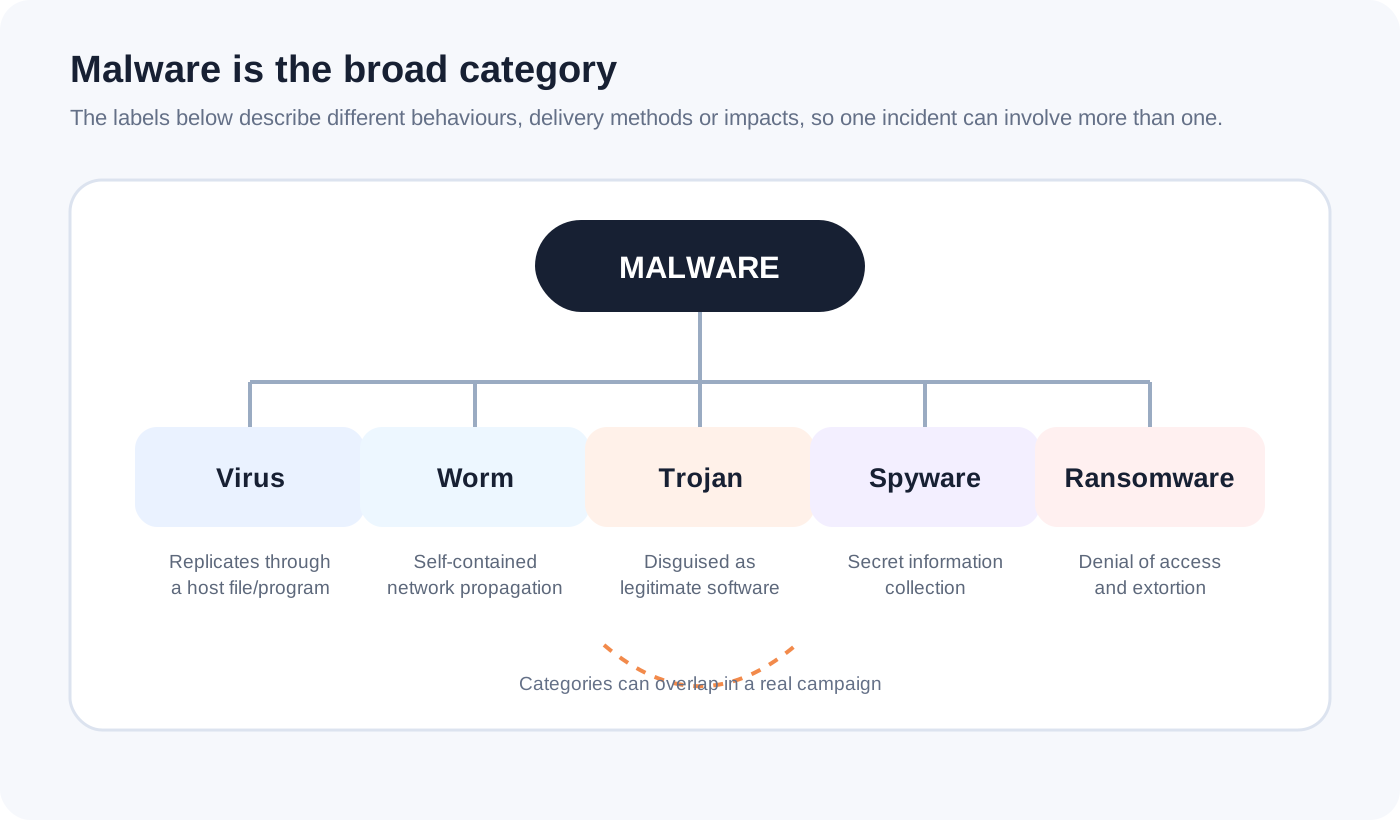
The diagram is intentionally about relationships rather than brand names or malware families. The important point is that the labels answer different questions. “Worm” tells us something about propagation. “Spyware” tells us something about purpose. “Ransomware” tells us something about impact and extortion. A single incident can therefore involve more than one label.
What is a computer virus?
A computer virus is self-replicating malicious code that attaches itself to another program or file. NIST describes a virus as requiring a host program to run for the virus to become active. That host relationship is the important distinction.
Imagine an infected executable file. When the user runs it, the malicious code may execute and attempt to place copies into other suitable files. The virus is not simply “bad software”. Its defining characteristic is replication through a host.
That also explains why saying “my computer has a virus” is often technically imprecise. The device may instead contain a Trojan, spyware, ransomware or another form of malware that does not behave like a virus at all.
What is a worm?
A worm is also self-replicating, but unlike a virus it does not need to attach itself to a host program. NIST describes a worm as a self-contained program that can propagate through networking mechanisms.
This difference has practical consequences. If a worm can exploit a reachable weakness or otherwise propagate between systems, one compromised device can become a path toward other devices. That makes network exposure, patching and segmentation important controls in addition to endpoint protection.
A simplified propagation chain looks like this:
- A vulnerable or otherwise reachable system is compromised.
- The worm executes on that system.
- It searches for additional systems it can reach.
- It attempts to propagate a working copy of itself.
- Newly affected systems can repeat the process.
This is a model of the behaviour, not a claim that every worm spreads in exactly the same way. The exploited service, authentication method, network path and payload can differ substantially.
What is a Trojan?
A Trojan, named after the Trojan Horse story, relies on deception. It presents itself as something legitimate or useful while carrying an unwanted malicious function.
For a general user, this could look like a fake installer, cracked application, document, update, browser extension or utility downloaded from an untrusted source. The user believes they are authorising one thing, but the software performs something else.
The key lesson is that the filename or appearance of an application is not proof of trustworthiness. A familiar icon and convincing installer can be copied. Trust should come from the source, software-signing information where applicable, reputation, permissions requested, and the context in which the file arrived.
A Trojan does not need to replicate like a virus or worm. Its role may simply be to establish access, steal information, or install another payload.
What is spyware?
Spyware is malware intended to gather information without the affected person’s or organisation’s knowledge. NIST’s glossary describes spyware as software secretly installed to collect information, and also summarises it as malware intended to violate a user’s privacy.
The information targeted can vary. Depending on the malware and permissions obtained, it may seek browsing activity, credentials, personal information, screenshots, keystrokes or other data accessible to the compromised environment.
This is why an infected device can undermine otherwise secure services. Encryption protects data while it travels between systems, but it cannot solve every problem on an endpoint that has already been compromised. If malicious software can observe information before encryption or after decryption, the secure network connection does not magically make the endpoint trustworthy.
For the same reason, if you believe credentials were stolen, changing the password on the suspected infected device may not be enough. Use a known-clean device where possible, secure the underlying account, review active sessions and enable strong multi-factor authentication.
What is ransomware?
Ransomware is malware used to deny access to data or systems and demand payment for restoration. Modern ransomware incidents can also involve data theft and extortion, so the problem is not always limited to encrypted files.
The defensive lesson is more important than the ransom screen itself. Recovery planning must exist before an incident. If the only copy of important files is directly reachable from the infected system, malware may be able to affect that copy too.
Good backup design therefore considers separation, access controls, restoration testing and recovery time, not merely whether a backup job reports success.
CISA’s ransomware guidance also emphasises containment and identifying the systems and accounts involved in the initial breach. That reflects an important incident-response principle: removing an obvious ransomware binary is not necessarily the same as removing the attacker’s access.
A dedicated article in this series will examine how ransomware attacks work in more depth once it is published.
How does malware actually get onto a device?
There is no single malware entry point. Attackers choose delivery paths based on the people, software and systems they are targeting.
Common routes include malicious attachments or links, fake software downloads, compromised websites, malicious advertisements, untrusted browser extensions, removable media, stolen credentials, exposed remote services and exploitation of software vulnerabilities.
This is where social engineering and technical exploitation often meet. An attacker may not need a sophisticated software vulnerability if a convincing message persuades someone to run an unsafe file. Conversely, a well-trained user cannot compensate for every unpatched remotely exploitable service. Effective defence needs both human and technical controls.
A useful way to analyse an infection is as a chain:
delivery -> execution -> persistence or access -> malicious action -> impact
Breaking the chain at any stage can help. Email filtering can stop delivery. Application controls can prevent execution. Endpoint detection can identify suspicious behaviour. Least privilege can reduce what malicious code can change. Network segmentation can restrict movement. Backups can improve recovery after destructive impact.
This layered approach is more reliable than expecting one antivirus product to solve every malware problem.
What are the warning signs of malware?
Some malware is noisy. Other malware is specifically designed to remain unnoticed. That means there is no universal symptom that proves a device is infected.
Possible warning signs include unexpected security alerts, unknown applications, browser changes, unusual account logins, files becoming inaccessible, unexplained network activity, security tools being disabled, unexpected processes, or sudden performance problems.
But each of those can also have a legitimate explanation. A slow computer might have insufficient memory, a failing drive, too many background applications, an operating-system update or a hardware problem. A pop-up claiming “your device has 17 viruses” may itself be a deceptive webpage rather than evidence that a scan found anything.
The correct approach is evidence-based diagnosis, not panic. Ask what changed, when it changed, what trusted security tools report, what accounts show unusual activity, and whether there are logs or other indicators that support the suspicion.
What should you do if you suspect malware?
For a personal device, the safest response depends on the symptoms and importance of the data, but a sensible sequence is:
- Stop risky activity. Do not continue banking, entering passwords or handling sensitive information on a device you reasonably believe is compromised.
- Disconnect when containment is needed. If malware appears active, is spreading, or is communicating externally, disconnecting the device from networks can reduce further activity. Do not randomly power off business systems if doing so could destroy volatile evidence or disrupt an incident investigation.
- Use trusted security tools. Run current anti-malware or endpoint security tools from trusted sources. Follow your operating-system or security vendor’s recovery guidance.
- Secure accounts from a clean device. Prioritise email and other accounts that can reset passwords for additional services. Review sessions and multi-factor authentication.
- Preserve what matters. In an organisation, contact the security or IT team and preserve evidence. On a personal device, be careful not to back up malicious executables alongside documents you need to recover.
- Recover to a known-good state. For serious compromise, rebuilding or resetting the device and restoring verified data can provide greater confidence than repeatedly deleting suspicious files.
- Find the entry point. If the vulnerable application, exposed account or unsafe download remains, the same problem can return.
If the device belongs to an employer, school or another organisation, follow its incident process rather than performing an independent cleanup. The organisation may need logs, forensic evidence or coordinated containment across multiple systems.
Why antivirus alone is not enough
Anti-malware software remains useful. NIST describes antivirus or anti-malware software as software designed to detect many forms of malware, prevent infection and potentially cleanse infected computers. But detection is one layer of defence, not a guarantee.
Consider a malicious file that has never been seen before. A security product may still detect it through behaviour, reputation or other techniques, but no defensive product should be treated as infallible. Similarly, a perfectly functioning endpoint product cannot patch an insecure internet-facing service by itself or stop every user from disclosing credentials to a fake login page.
A stronger personal baseline combines:
- automatic operating-system and application updates;
- reputable anti-malware protection kept enabled and updated;
- software from trusted sources;
- strong, unique passwords stored in a password manager;
- multi-factor authentication, especially for email and important accounts;
- backups that can survive loss or compromise of the main device;
- caution with unexpected links, attachments and permission requests;
- removal of software and services you no longer need.
For organisations, add central logging, endpoint detection and response where appropriate, asset management, vulnerability management, network segmentation, least privilege, tested incident response and controlled backups.
A practical example: why layered defence matters
Suppose someone receives an email claiming to contain an invoice. The attachment is actually a Trojan. The recipient opens it, and the program attempts to establish persistence and download a credential-stealing component.
There are several opportunities to stop the incident.
The mail service may block the attachment. If it reaches the user, operating-system protections may prevent execution. Endpoint security may identify suspicious behaviour. A standard user account may limit system-level changes. Network controls may block communication with known malicious infrastructure. Multi-factor authentication can make some stolen passwords less immediately useful. Monitoring may identify unusual logins. Backups provide a recovery option if a later payload damages files.
None of these controls proves the others are unnecessary. Their value comes from independence. If one control fails, another can still interrupt the chain.
That is the same security principle used in more complex systems: reduce the probability that one mistake becomes total compromise.
Malware, phishing and hacked accounts are related but different
It is useful to keep three ideas separate.
Malware is malicious software or code. Phishing is a deceptive technique used to persuade a person to reveal information or take an unsafe action. Account compromise means someone has obtained unauthorised access to an account.
A phishing message can deliver malware. A phishing site can steal a password without installing malware. Malware can steal a password without phishing. A reused password exposed in an unrelated breach can also lead to account compromise without either phishing or malware on the victim’s device.
Understanding the distinction helps you choose the right control. Anti-malware software cannot fix password reuse. Multi-factor authentication cannot remove spyware already running on a laptop. Security awareness cannot patch a vulnerable server. Controls should match the failure mode.
The most useful way to think about malware
Memorising malware names is less useful than understanding behaviour, trust boundaries and impact.
When investigating a suspicious program, ask:
- How did it arrive and what caused it to execute?
- Does it replicate, and if so, how?
- What permissions does it have?
- What information can it read?
- Can it persist after restart?
- Can it communicate with other systems?
- What accounts or credentials may have been exposed?
- What evidence supports the conclusion?
- What must be changed so the same entry path cannot be used again?
Those questions turn “I think I have a virus” into a structured security problem.
Malware will continue to change, but the defensive reasoning remains surprisingly stable: reduce unnecessary exposure, keep systems current, restrict privileges, distrust unexpected code, make important accounts harder to take over, maintain recoverable backups, and respond based on evidence rather than a single symptom.
For related foundations, see Cybersecurity vs Information Security and What Is AI Security?. AI changes parts of the threat landscape, but conventional endpoint and application security still matter.
Sources and further reading
- NIST CSRC Glossary: Malware, with definitions sourced from NIST and CNSSI publications. The NIST glossary states its terms were last updated May 29, 2026.
- NIST CSRC Glossary: Virus, including the host-program distinction used in this article.
- NIST CSRC Glossary: Worm, describing independent self-replication and network propagation.
- NIST CSRC Glossary: Spyware, covering covert information collection and privacy impact.
- NIST Small Business Cybersecurity Glossary, for malware, anti-malware, backups and network segmentation concepts.
- CISA Malware Tip Card, an accessible overview of common malware categories.
- CISA and MS-ISAC Ransomware Guide, for ransomware prevention, containment and response guidance.
The cover and malware relationship diagram in this article are original illustrations created for dulmina.com from the independently verified concepts above. They are explanatory diagrams, not screenshots or incident evidence.