Phishing is a form of social engineering in which an attacker sends a convincing message designed to make you do something unsafe. The message may ask you to sign in, open an attachment, approve a payment, share a one-time code, reset a password, or provide sensitive information. It often impersonates a bank, employer, delivery company, online service, colleague or another person you are likely to trust.
The difficult part is that modern phishing does not always look obviously fake. Perfect spelling, a familiar logo and a professional design are not proof that a message is genuine. NIST now explicitly warns that artificial intelligence can help attackers create increasingly convincing phishing messages. The safer habit is therefore not simply to search for bad grammar. It is to examine the request, context and verification path.
If you remember one rule, make it this: when an unexpected message asks you to take a sensitive action, do not use the message itself to prove that the message is genuine. Open the organisation’s known website yourself, use its official app, or contact the person through a trusted channel you already have.
What actually makes a message phishing?
A phishing message is built around deception. The attacker wants the recipient to believe that the message has a trustworthy origin or legitimate purpose. The final objective varies. Credential theft is common, but phishing can also be used to deliver malware, steal financial information, capture authentication codes, redirect payments or persuade someone to disclose other valuable information.
A typical credential-phishing chain looks like this:
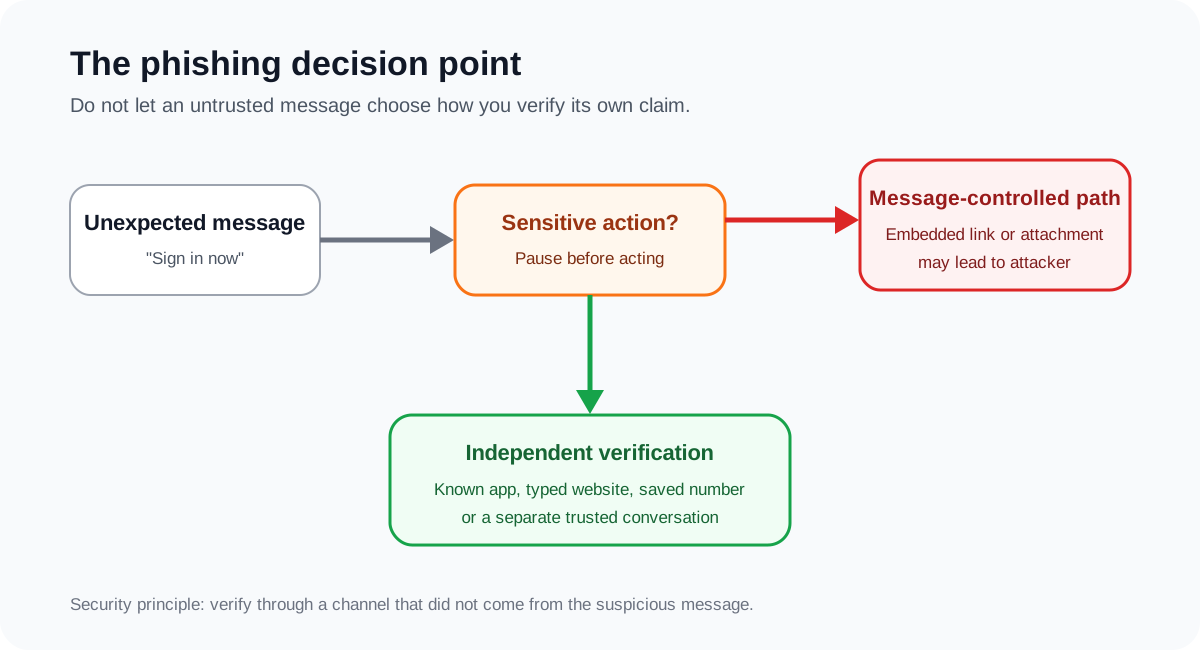
The crucial security boundary is the point where the message tries to move you from reading to acting. A link can lead to an imitation login page. An attachment can contain malicious content. A reply can begin a longer social-engineering conversation. An urgent payment request can bypass normal business controls without using malware at all.
This is why phishing should be understood as a decision-manipulation problem, not just an email problem.
The warning signs that matter most
No single visual clue can reliably identify every phishing message. Instead, combine several signals and give the most weight to what the sender is asking you to do.
1. The message creates urgency or emotional pressure
NIST, CISA and the US Federal Trade Commission all identify urgency as a common phishing or scam technique. A message may claim that your account will be closed, a payment failed, suspicious activity was detected, a package cannot be delivered, or a senior employee needs an immediate transfer.
Urgency matters because it changes how people make decisions. The attacker wants the recipient to solve the apparent problem before checking whether the problem is real.
A useful response is deliberately boring: stop, open a separate trusted channel, and verify.
2. The requested action is unusually sensitive
Be cautious when an unexpected message asks you to:
- enter a password or one-time code;
- provide bank, card or identity information;
- change payment details;
- transfer money;
- download or enable something;
- open an unexpected attachment;
- approve a login or MFA request;
- bypass a normal organisational process.
The FTC advises people not to click links or download attachments in unexpected messages and to contact the organisation using contact information they already know is real.
3. The visible sender name and actual address do not agree
Email applications often display a friendly name more prominently than the underlying address. A message can therefore appear to come from a familiar organisation while using an unrelated or subtly misspelled domain.
Check the complete sender address, but do not treat a plausible address as absolute proof. Email authentication and anti-spoofing controls can reduce impersonation, yet compromised legitimate accounts and lookalike domains can still be used in attacks.
4. The link destination is not what you expected
On a desktop browser, hovering over a link can reveal its destination. On mobile devices, interfaces differ, so avoid experimenting with a suspicious link merely to inspect it. A safer option is often to ignore the embedded link and navigate independently to the known service.
Pay attention to the actual registered domain, not just words that appear somewhere in a long address. An attacker can place a trusted brand name in a subdomain, path or query string while the real domain belongs to the attacker.
For example, the important question is not whether an address contains the word examplebank. The question is whether the browser is actually connecting to the bank’s genuine domain.
5. The context does not make sense
Context can expose a phish even when the design is excellent. Ask simple questions:
- Was I expecting this document, invoice or invitation?
- Do I even have an account with this organisation?
- Would this colleague normally make this request in this way?
- Does the request match our normal payment or approval process?
- Why would an organisation need information it should already possess?
The FTC’s May 2026 warning about fake party invitations illustrates this well. Some phishing messages impersonated familiar invitation services and asked recipients to enter email credentials or codes to view an invitation. The visual theme was less important than the abnormal request for authentication information.
A safer verification method
Instead of trying to become a perfect phishing detector, use a process that remains safe even when the message looks convincing.
| Step | Question | Safer action |
|---|---|---|
| Pause | Is the message pushing me to act quickly? | Do not let the stated deadline replace verification. |
| Inspect | Is the sender, request or destination unusual? | Check the full address and context without opening suspicious content. |
| Separate | Can I verify this without using anything supplied in the message? | Open the known app or type the known website yourself. |
| Confirm | Is a person asking for money, credentials or an unusual action? | Contact them using an established phone number or separate conversation. |
| Act | Does the request also appear in the trusted channel? | Continue through the trusted service, not through the suspicious message. |
| Report | Does the message appear malicious? | Use your provider or organisation’s phishing-reporting process, then delete it as appropriate. |
This approach is stronger than relying on a checklist of cosmetic mistakes because it changes the trust relationship. The suspicious message is treated as an untrusted claim. Confirmation must come from somewhere else.
Why HTTPS and a padlock are not enough
A common misconception is that a padlock means a website is legitimate. HTTPS protects the connection between your browser and the site. It does not prove that the site owner is honest.
A phishing site can use HTTPS too. The browser may therefore establish an encrypted connection to an attacker’s fake login page. Encryption protects the data in transit, but if you intentionally submit your password to the attacker’s server, the attacker still receives it.
HTTPS is important, but it answers a different security question.
Why MFA helps, but not every MFA method is phishing-resistant
Multi-factor authentication is an important layer because a stolen password alone may no longer be enough to access an account. NIST recommends MFA and also distinguishes ordinary MFA from phishing-resistant authentication.
This distinction matters. NIST SP 800-63B-4 explains that manually entered authenticator outputs, such as many one-time passwords, are not considered phishing-resistant because an impostor can potentially relay the value to the genuine service. Cryptographic authenticators that bind authentication to the legitimate verifier can provide stronger protection.
For users and organisations, the practical hierarchy is:
- enable MFA rather than relying on a password alone;
- prefer phishing-resistant options such as FIDO/WebAuthn authenticators when the service supports them;
- never approve an unexpected authentication request or share a code because someone asks for it;
- protect account recovery methods as carefully as the primary login.
MFA reduces risk, but it should not make a suspicious login page trustworthy.
Email security controls organisations should use
User awareness is only one layer. CISA recommends technical controls including SPF, DKIM and DMARC to help verify email origins and reduce some forms of spoofing. Organisations can also use filtering, malicious-domain blocking, endpoint protection and security monitoring.
These controls are valuable, but none should be interpreted as permission to send every suspicious decision to the user. A stronger design combines preventive controls with resilient authentication and business processes.
For example, a company can require that changes to supplier bank details are independently verified through a known contact and approved through a controlled workflow. That protects against a fraudulent payment request even if the email looks convincing or comes from a compromised mailbox.
The principle is similar to protecting API keys and credentials when using AI tools: sensitive actions should have boundaries that do not depend on one message, one prompt or one person’s momentary judgement.
What should you do if you already clicked?
Clicking a suspicious link does not automatically mean that every account is compromised. What matters is what happened next.
If you clicked but did not enter information, close the page. If a file was downloaded or executed, or the device behaves unexpectedly, follow trusted security guidance and consider scanning or isolating the device as appropriate. The response becomes more urgent if software was installed or an attachment executed.
If you entered a password into a phishing page, treat that password as compromised. Change it through the genuine service from a trusted device, and change it anywhere else it was reused. Review active sessions and account security settings where available. If the account supports MFA, enable it, preferably using a phishing-resistant option when possible.
If you provided financial information or authorised a payment, contact the relevant financial institution through its official channel immediately. Speed can matter when attempting to stop or investigate a fraudulent transaction.
If an organisational account or device is involved, report the incident through the organisation’s established security or IT process. Do not quietly delete evidence and hope nothing happened. The organisation may need to revoke sessions, reset credentials, inspect mail rules, check endpoint activity or investigate related accounts.
If the phishing attempt delivered malicious software, the broader response may overlap with the containment and recovery steps discussed in What Is Malware? and What Is Ransomware?.
A polished email can still be malicious
Older phishing advice often emphasised spelling errors, strange formatting and generic greetings. Those clues can still be useful, but they are weak as a primary defence. Legitimate messages can contain mistakes, while attackers can produce polished writing and accurately copy branding.
AI makes this limitation even clearer. NIST notes that AI can be used to craft increasingly convincing phishing attacks. That does not make phishing impossible to recognise. It means defenders should move from “Does this email look professional?” to “Is this request expected, and can I verify it independently?”
That is a much more durable security habit.
A practical 20-second phishing check
Before acting on an unexpected message, ask:
- What exactly is this message asking me to do?
- What happens if the sender is lying?
- Can I verify the request without clicking, replying or calling a number supplied in the message?
- Is the action sensitive enough to require a second check?
If the answer to the third question is yes, use that independent route. Open the official app, type the known website, call a saved number, or start a new conversation with the person.
The goal is not to prove that every suspicious message is malicious. The goal is to avoid giving an untrusted message the power to choose both the problem and the path you use to solve it.