A login form can look simple while hiding some of the most important security decisions in an application. The system has to identify the account, verify an authenticator, resist automated attacks, manage sessions and provide a safe recovery path. A weakness in any of those stages can allow account takeover even when the password itself is strong.
OWASP’s Top 10:2025 places Identification and Authentication Failures at A07. The category covers weaknesses such as brute-force exposure, credential stuffing, weak recovery, missing multi-factor authentication and unsafe session handling. Authentication security is therefore much broader than choosing a good password. OWASP Top 10:2025 A07
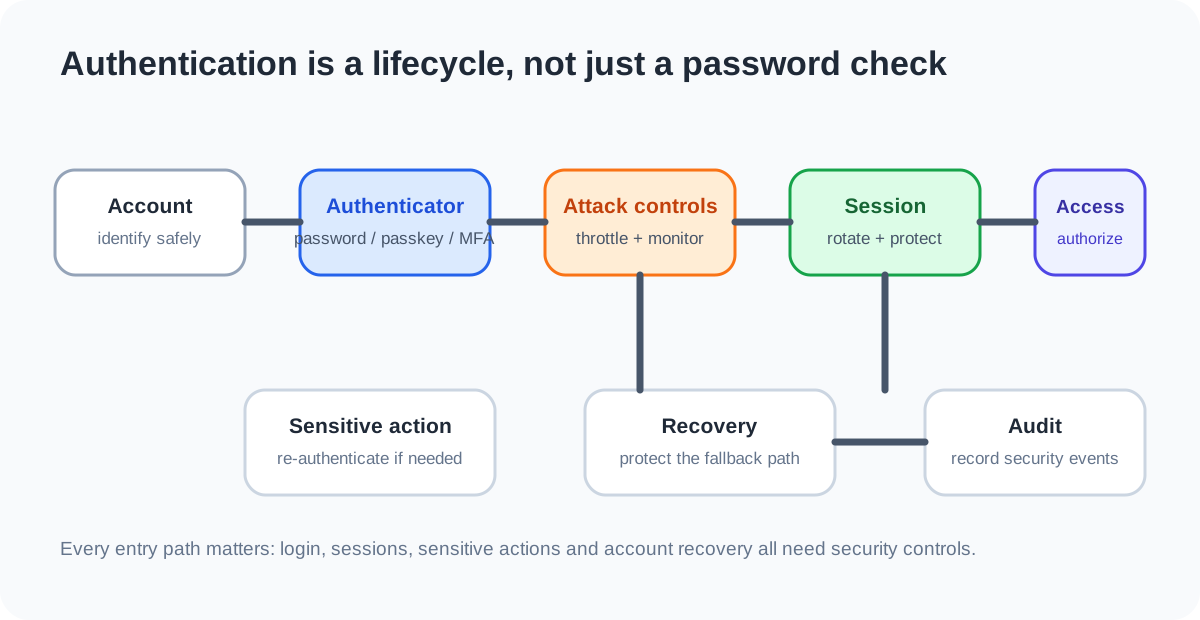
Authentication is more than checking a password
Authentication answers a basic question: “Who is this user, and what evidence do they have that supports that claim?” Authorization is a separate question: “What is this authenticated user allowed to do?”
A secure application needs both. A perfectly implemented login system does not stop an authenticated user from accessing another customer’s data if authorization checks are missing. Conversely, strong authorization rules are difficult to rely on if attackers can take over legitimate accounts.
OWASP recommends treating authentication, authorization and session management as related but distinct security controls. The OWASP Authentication Cheat Sheet provides implementation guidance covering passwords, recovery, MFA, throttling, session-related concerns and authentication responses.
Mistake 1: Treating passwords as the whole security system
Passwords remain common, but a password alone is vulnerable to phishing, credential stuffing, guessing and reuse. A unique password generated by a password manager is much stronger than a reused password, but it still depends on the user not handing the secret to an attacker.
Modern applications should support stronger authenticators where appropriate. NIST’s Digital Identity Guidelines, SP 800-63-4, describe authentication requirements and recognize phishing-resistant cryptographic authentication as an important security property. NIST SP 800-63-4
For high-value accounts, consider passkeys or other phishing-resistant authenticators when the service supports them. My earlier guide, Passkeys vs Passwords, explains why origin-bound cryptographic credentials change the phishing problem.
Mistake 2: Allowing unlimited login attempts
An attacker does not have to guess a password manually. Automated systems can try large numbers of credentials, including username and password pairs obtained from previous breaches.
The application should apply appropriate defenses such as rate limiting, login throttling and, where justified, additional verification. The control should be designed carefully because an aggressive account lockout can itself become a denial-of-service mechanism. OWASP recommends balancing attack resistance with availability rather than blindly locking accounts after a fixed number of failures.
A useful implementation pattern is to consider multiple signals rather than only the source IP. Attackers can distribute requests across many addresses, while legitimate users can share networks. Monitoring should look for patterns such as repeated failures against one account, many accounts from one source, and bursts of credential attempts.
Mistake 3: Revealing whether an account exists
Authentication endpoints can accidentally become an account directory.
Suppose a login page says “password incorrect” when an account exists but says “user not found” when it does not. An attacker can test many addresses and learn which accounts are registered. Password reset and registration endpoints can leak the same information.
A safer pattern is to return a consistent user-facing response where practical, such as an invalid credential message for both cases. The application should also consider whether status codes, response timing or other observable differences reveal the same information.
This is called account enumeration. It may not directly log an attacker in, but it gives them better input for credential stuffing, phishing and targeted attacks.
Mistake 4: Storing passwords incorrectly
Applications should never need to retrieve a user’s original password. Passwords should be stored using a password hashing scheme designed for this purpose, with appropriate salting and parameters, rather than reversible encryption or plaintext storage.
The exact algorithm and configuration should follow current platform and security guidance. The important design principle is that a database compromise should not immediately reveal every user’s original password.
Also remember that password storage is only one part of credential security. Password reset tokens, session identifiers and API credentials have different requirements and should not simply be treated as passwords stored in another column.
Mistake 5: Building a weak password reset process
A secure login can be undermined by an insecure “Forgot password?” flow.
A reset mechanism should provide strong evidence that the requester controls an appropriate recovery channel. Reset tokens should be unpredictable, protected in transit, limited in scope and time, and invalidated when used. Sensitive account changes may also justify re-authentication or additional verification.
Knowledge-based questions are a particularly weak recovery mechanism because answers may be public, guessable or reused elsewhere. Recovery should be designed as part of the authentication system, not as a convenient support feature added later.
OWASP explicitly includes secure password recovery in its Authentication Cheat Sheet and recommends re-authentication for sensitive account changes.
Mistake 6: Creating a session before authentication is complete
A login system does not end when the password is verified. The application has to establish a secure authenticated session.
Session identifiers should be generated with sufficient randomness, protected from exposure and invalidated appropriately. A successful login should not leave an attacker able to reuse an earlier session identifier if the application is vulnerable to session fixation.
Cookies used for authentication should be configured with appropriate security attributes, and sessions should have sensible idle and absolute lifetime controls. Logout should invalidate the session rather than merely redirecting the browser to a public page.
Session security matters because stealing a valid session can bypass the need to know the password at all.
Mistake 7: Forgetting re-authentication for sensitive actions
A long-lived session is convenient, but some actions deserve stronger proof that the legitimate user is still present.
Changing an email address, password, recovery factor or other high-impact account setting can be a good trigger for re-authentication. Financial or administrative applications may need stronger transaction-level controls as well.
OWASP recommends re-authentication for sensitive features and suggests context-aware decisions. The goal is not to make every click annoying. It is to add stronger evidence at the points where account takeover would become more damaging.
Mistake 8: Missing multi-factor authentication
Multi-factor authentication adds another barrier when a password is compromised. But not all second factors provide the same phishing resistance.
NIST distinguishes stronger phishing-resistant authentication from methods that depend on manually entering a code. FIDO-based authenticators and WebAuthn can bind authentication to the intended relying party, making them much harder to relay through a fake login page.
For an application handling sensitive information or privileged accounts, offering a phishing-resistant option can materially improve the authentication boundary. The service should also provide a carefully designed recovery path so that adding MFA does not simply move the weakness into account recovery.
Mistake 9: Trusting the frontend to enforce authentication rules
A browser interface might hide an admin button from ordinary users. That is useful for usability, but it is not authorization.
The server or trusted backend must independently verify that the authenticated identity has permission for the requested operation. This is especially important for APIs because users can send requests without using the normal interface.
The same principle applies to authentication workflows. A frontend should not be trusted to decide whether a token is valid, whether a user is an administrator or whether a sensitive operation needs stronger authentication.
Mistake 10: Logging too little to investigate attacks
Authentication failures are security signals. If an application does not record them, defenders may have little evidence that credential stuffing or brute-force activity is occurring.
Useful events can include successful and failed authentication, account lockouts, recovery events, changes to authenticators, suspicious session behavior and authorization failures. Logs should contain enough context for investigation while avoiding unnecessary exposure of passwords, tokens and other secrets.
OWASP’s Logging Cheat Sheet recommends logging authentication successes and failures and monitoring authorization failures and other security-relevant events. OWASP Logging Cheat Sheet
A safer authentication flow
A robust application can treat login as a sequence of controls rather than one password check:
| Stage | Security question | Useful controls |
|---|---|---|
| Account lookup | Can the endpoint reveal registered accounts? | Consistent responses, careful timing and status handling |
| Credential verification | Is the authenticator protected? | Strong password hashing, passkeys or MFA where appropriate |
| Attack resistance | Can automation overwhelm the endpoint? | Rate limiting, throttling, monitoring and adaptive controls |
| Session creation | Can a session be fixed or stolen? | Secure random IDs, protected cookies, rotation and expiry |
| Sensitive action | Is stronger proof needed here? | Re-authentication or transaction authorization |
| Recovery | Can an attacker bypass the login? | Strong recovery factors, short-lived tokens and careful invalidation |
| Monitoring | Can abuse be detected? | Authentication and authorization event logging |
The exact implementation depends on the application’s risk and architecture, but the sequence makes one important point clear: authentication is a lifecycle.
What developers should test
Authentication testing should cover more than the happy path. Test cases should ask what happens when credentials are wrong, repeated, expired, missing, revoked or deliberately malformed.
At minimum, review:
- repeated failed login attempts;
- credential stuffing and password spraying defenses;
- account enumeration through login and recovery endpoints;
- password reset token expiry and reuse;
- changes to email addresses and recovery factors;
- session rotation after login;
- logout and session invalidation;
- concurrent sessions and device removal;
- MFA enrollment, removal and recovery;
- authorization checks on API endpoints;
- logging and alerting for authentication abuse.
For a deeper view of web application testing, the OWASP Web Security Testing Guide provides a structured reference for security testing activities.
A practical developer checklist
Before releasing an authentication system, ask:
- Are passwords stored with an appropriate password hashing mechanism?
- Is MFA available for sensitive accounts?
- Can the application support phishing-resistant authentication where appropriate?
- Are login and recovery endpoints protected against automated attacks?
- Do authentication responses avoid unnecessary account enumeration?
- Are reset tokens short-lived, single-use and protected?
- Are sessions rotated and invalidated correctly?
- Are sensitive account changes protected by re-authentication?
- Are authorization checks enforced server-side?
- Are authentication and authorization events logged without recording secrets?
- Can compromised credentials and sessions be revoked quickly?
If the answer to these questions is “yes,” the application has a much stronger foundation than one that simply checks a password against a database.
The main lesson
Authentication failures rarely come from one dramatic mistake. They often appear at the edges of the login process: a reset flow that is too easy to abuse, a session that lives too long, an endpoint that reveals account existence, an API that trusts the frontend, or an admin account protected only by a password.
Good authentication design treats identity, authenticators, attack resistance, sessions, recovery and monitoring as one security lifecycle. Stronger technologies such as passkeys can improve the core authentication step, but they still need safe enrollment, recovery, authorization and session controls around them.
The objective is not to make login complicated. It is to make every path into the account deserve the same level of security as the account itself.