Email is more than a place where messages arrive. For many people it is the recovery channel for banking, social media, cloud storage, shopping and work accounts. If someone gains control of your mailbox, they may be able to reset passwords elsewhere, read private conversations, impersonate you or quietly forward future messages to themselves.
That makes a suspected email compromise worth investigating quickly. It also makes accuracy important. A delayed message, spam email or unfamiliar-looking interface does not by itself prove that someone hacked your account.
The strongest conclusion comes from several pieces of evidence: sign-in history, security alerts, account changes, mail rules, sent messages, recovery information and active sessions.
The strongest signs that your email may be compromised
Some warning signs are much more meaningful than others. If you notice one of the following, check the account directly through the provider’s official website or app rather than clicking a link in an alert email.
1. A successful sign-in that you cannot explain
An unfamiliar successful login is one of the clearest indicators, especially when the device, approximate location and time do not match your activity.
Location alone is not perfect evidence. Mobile networks, VPNs, corporate gateways and IP geolocation can make a legitimate session appear to come from somewhere unexpected. A device you recognize at the exact time you were using the account may therefore be less concerning than a new device signing in while you were asleep.
Look at the evidence together rather than treating the city name as proof.
2. Security or recovery information changed without you
An attacker who expects to keep an account may try to change the recovery email, phone number, password, passkey, MFA method or other sign-in information.
An unexpected notification about one of these changes deserves immediate attention. Do not approve a sign-in request simply because repeated prompts become annoying. Open the provider directly and inspect the security settings.
3. Messages were sent that you did not send
Check Sent, Drafts, Trash or Deleted Items and, where available, account activity. Messages asking your contacts for money, credentials, urgent favors or files are obvious warning signs.
But the absence of suspicious mail in Sent does not prove that the account is safe. An intruder may delete evidence or use the mailbox mainly to receive password-reset messages.
4. Forwarding or inbox rules appeared unexpectedly
This is an important check because mailbox compromise can be quiet.
A malicious forwarding rule can copy incoming mail to another address. A rule can also move security alerts, invoices or password-reset messages into another folder, archive them or delete them so that the account owner is less likely to notice.
Microsoft’s current guidance for a compromised account specifically tells users to review settings such as connected accounts, forwarding and automatic replies after regaining control. That is a useful reminder that changing the password alone may not remove every persistence mechanism.
5. You are unexpectedly locked out
A password that suddenly stops working can indicate that somebody changed it, although forgotten passwords, synchronization problems and provider security actions can produce similar symptoms.
If recovery information has also changed or the provider reports suspicious activity, treat the situation as a likely compromise and start the official recovery process immediately.
6. Password-reset messages for other services appear unexpectedly
One unsolicited reset email can simply mean that someone mistyped an address or tried a reset that they could not complete. A cluster of resets, especially alongside suspicious email sign-ins, is more concerning.
Remember the direction of risk: control of your email can help an attacker compromise other accounts. That is why securing the mailbox should be a priority.
Weak clues that are not proof by themselves
People sometimes conclude that their mailbox is hacked because they receive more spam, a message claims to know their password, or an email appears to come from their own address.
Those events can be concerning, but they do not necessarily demonstrate mailbox access.
Email sender information can be spoofed. Spam volume changes constantly. A password quoted in an extortion message may have come from an old breach involving another service rather than from current access to your email.
A better investigation asks: what evidence shows that an unauthorized person authenticated to, changed or used this account?
| Observation | How strong is it? | What to check next |
|---|---|---|
| More spam than usual | Weak | Spam controls and breach exposure, but do not assume account access |
| Email appears to be from your own address | Weak by itself | Message details plus account sign-in and sent activity |
| Unfamiliar login location | Moderate | Device, time, IP context and whether the login succeeded |
| Unknown successful session or device | Strong | Revoke session and inspect security settings |
| Recovery email or MFA method changed | Strong | Recover account and remove unauthorized methods |
| Unknown forwarding rule | Strong | Remove it and investigate how account access occurred |
| Messages genuinely sent from your account | Strong | Secure account, review sessions and warn affected contacts |
The table is a practical triage model, not a universal scoring system. Providers expose different evidence, and context matters.
How to check your email account properly
Start from a device you trust. If you suspect the computer itself is infected, update its security software and scan it, or use another trusted device for account recovery. Microsoft explicitly recommends checking a potentially compromised PC for malware as part of its hacked-account recovery process.
Then open your email provider’s official site or app manually.
Check recent security activity
Look for pages named things such as Recent Activity, Security Activity, Your Devices or Sign-in Activity. Focus on successful access, not merely failed attempts.
For each unfamiliar entry, consider:
- Was the login successful?
- Do you recognize the device or browser?
- Does the time correspond with your own activity?
- Could a VPN or mobile network explain the approximate location?
- Did a security setting change shortly afterward?
If the provider offers a button to report that an activity was not yours, use it.
Review active devices and sessions
An old phone or browser session may remain authorized even after you have forgotten about it. Remove devices you no longer own and revoke sessions you cannot identify.
If the provider offers a sign-out-everywhere function, it can be useful during recovery. Be prepared to sign back in on legitimate devices.
Inspect recovery and authentication methods
Verify every recovery email address, phone number, authenticator, passkey and security key associated with the account.
Remove anything you did not add. If a provider delays removal of security information as an anti-takeover measure, follow its official recovery process rather than trying to bypass the delay.
Inspect forwarding, filters and connected applications
Look for:
- automatic forwarding to unknown addresses;
- inbox rules you did not create;
- delegates or mailbox access you do not recognize;
- connected applications with unnecessary mail permissions;
- application-specific passwords you no longer need;
- automatic replies or signatures that were changed.
This step is easy to miss and matters because an attacker may preserve access to information even after the main password changes.
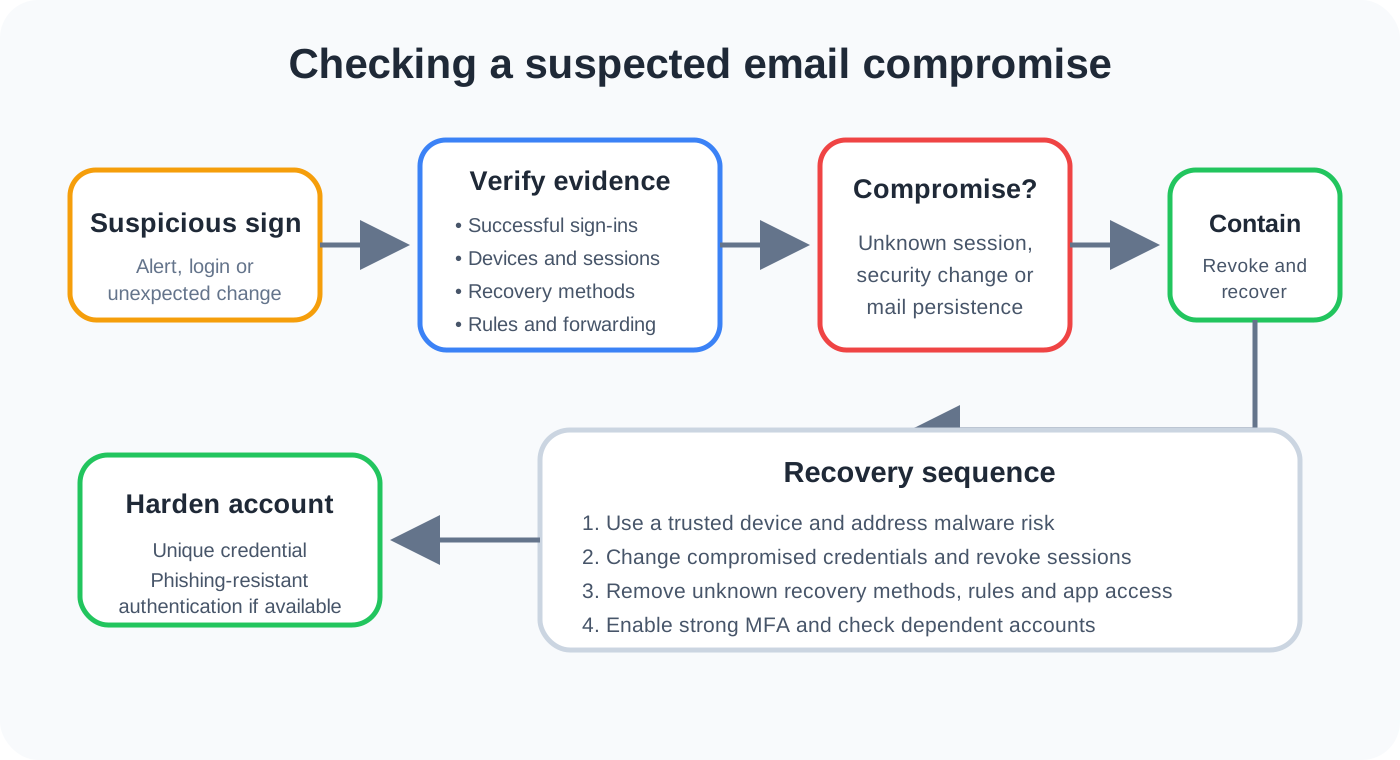
If you confirm compromise, use this recovery order
The exact screens differ between providers, but the security logic is consistent.
1. Use a trustworthy device
If there is a reasonable possibility that malware or a malicious browser extension captured your credentials, deal with that endpoint before trusting new credentials to it. Update the operating system and security software, remove suspicious extensions or applications, and scan where appropriate.
2. Change the email password
Use a new password that is not used on another service. If the same password was reused elsewhere, change those accounts too, starting with high-value services.
Current NIST Digital Identity Guidelines say passwords should be changed when there is evidence that the authenticator has been compromised rather than on an arbitrary periodic schedule. They also emphasize screening against known compromised passwords.
A password manager can make unique passwords much easier to maintain.
3. Remove unknown sessions and authentication methods
Changing a password is not the whole recovery process. Revoke sessions, remove unknown recovery methods and inspect app access.
NIST’s authenticator-management guidance says compromised authenticators should be invalidated promptly. The practical lesson for an individual account is simple: do not leave an authentication method under an attacker’s control attached to the account.
4. Turn on strong multi-factor authentication
MFA gives the account another barrier if a password is stolen. NIST notes that not all MFA methods provide the same resistance to phishing. Authentication methods based on FIDO/WebAuthn, commonly experienced as passkeys or security keys, can provide phishing resistance because authentication is bound to the legitimate service rather than relying on the user to recognize every fake login page.
If your provider supports passkeys or security keys and they fit your recovery needs, they are worth considering. An authenticator app is also generally preferable to password-only access. Keep recovery methods current so stronger authentication does not accidentally lock you out.
For a broader explanation of phishing, see What Is Phishing?. For SMS and phone-based social engineering, see Smishing and Vishing Explained.
5. Remove malicious mail rules and application access
Delete unauthorized forwarding, filters, delegates and connected applications. Review the settings again after recovery so you do not overlook a rule that was hidden among legitimate ones.
6. Check other accounts that depend on this mailbox
Prioritize services where the email address can reset a password or approve a sensitive action. Look for reset confirmations, new-device notices, purchase receipts and security changes that you did not initiate.
Do not click links inside suspicious messages while investigating. Navigate directly to the relevant service.
7. Warn contacts if your account sent malicious messages
If someone used your mailbox to send phishing or fraudulent requests, tell affected contacts through a trusted channel. Ask them not to open unexpected attachments, follow links, send money or provide credentials from those messages.
What if you cannot sign in?
Use the provider’s official account-recovery process. Avoid people on social media or messaging platforms who claim they can “hack back” the account or recover it for a fee. They may simply be running another scam.
Recovery works best when you can prove control through legitimate recovery methods and accurate account information. If you regain access, immediately complete the security review rather than stopping after the password reset.
Microsoft, for example, directs users of hacked Microsoft accounts to its sign-in helper and recovery process, then advises checking the device, changing or resetting the password and reviewing account settings.
Why email accounts are such valuable targets
A mailbox is a collection of information and an identity-recovery mechanism at the same time.
Old messages can reveal names, invoices, travel plans, business relationships and which services you use. Search makes years of information easy to explore. At the same time, many websites send account-recovery links to email.
This creates a chain:
Email account compromised
        |
        v
Attacker reads security and service history
        |
        v
Password resets or impersonation attempts
        |
        v
Other accounts or contacts may be targeted
The chain is not inevitable. Strong authentication on both the mailbox and connected services can interrupt it. But it explains why a suspicious email login should not be treated like an ordinary spam problem.
How to make future compromise less likely
Use a unique password or a passkey, enable MFA, keep recovery information current and protect the devices that access your mail. Be especially cautious when a login page is reached through an unsolicited message.
NIST’s current authentication guidance is useful here because it distinguishes ordinary MFA from phishing-resistant authentication. Passwords are not phishing-resistant, and manually entered one-time codes can still be relayed by a convincing fake site. WebAuthn-based authentication can bind the credential to the legitimate verifier, reducing that particular attack path.
For general account hygiene, also protect the email address itself from unnecessary exposure where practical and keep important accounts on unique credentials. If credentials are reused, one unrelated service breach can become an email takeover attempt through credential stuffing.
A five-minute email security review
If you are worried right now, this short sequence is a sensible starting point:
- Open the provider directly on a trusted device.
- Check recent successful sign-ins and active devices.
- Verify recovery information and MFA methods.
- Inspect forwarding, filters, delegates and connected apps.
- If anything indicates unauthorized access, change compromised credentials, revoke access and enable strong MFA.
- Check other important accounts that use the mailbox for recovery.
Do not wait for every possible symptom if you already have strong evidence of unauthorized access.
The key distinction: suspicion versus evidence
A useful security response avoids both extremes. Ignoring an unknown successful login because “it is probably nothing” is risky. Declaring an account hacked because one spam message arrived creates unnecessary panic.
Check the evidence the provider can actually show you. Successful sessions, unauthorized security changes, malicious forwarding and genuine sent activity are much stronger indicators than vague anomalies.
If compromise is confirmed, recovery is not just a password change. Secure the device, reset compromised credentials, remove attacker-controlled authentication and sessions, inspect mailbox persistence, protect dependent accounts and strengthen authentication for the future.
Sources and further reading
- NIST SP 800-63B-4: Authentication and Authenticator Management
- NIST: How Do I Create a Good Password?
- Microsoft Support: How to recover a hacked or compromised Microsoft account
- Microsoft Support: How to help keep your Microsoft account secure
- CISA: Mitigating Risk from Compromise of Microsoft Corporate Email