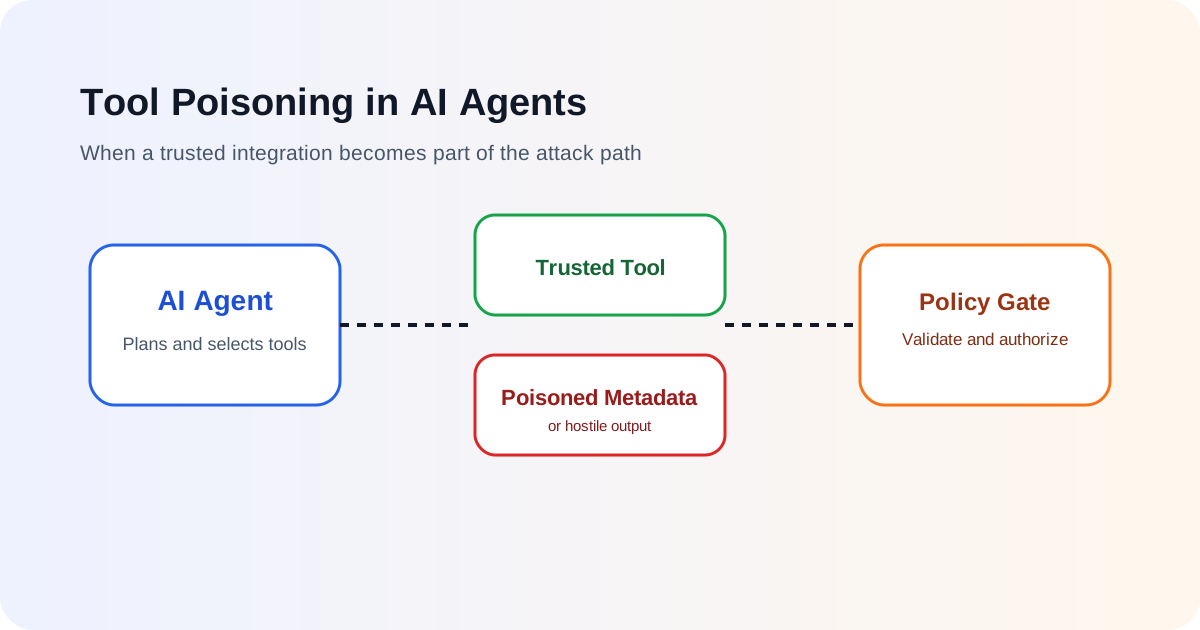
AI agents become useful when they can do more than generate text. A tool-enabled agent may search internal knowledge, send email, update tickets, query databases, call cloud APIs or operate a browser. That capability also creates a new trust problem: the agent must decide not only what information to believe, but which tools to invoke and how to use them.
Tool poisoning happens when an attacker manipulates a tool, its description, metadata, instructions, output or surrounding integration in a way that causes an agent to behave differently from what the user or developer intended.
The danger is easy to underestimate because the tool may look legitimate. It can have a trusted name, valid authentication and a normal-looking interface. The malicious influence may be hidden in descriptive text, dynamic metadata, returned content or a compromised downstream service.
This makes tool poisoning different from a traditional exploit that simply crashes a component or bypasses access control. The attacker may instead manipulate the agent’s decision-making process so that the agent voluntarily selects or misuses a trusted capability.
What counts as a tool in an AI agent system?
A tool is any external capability that the model or orchestration layer can invoke to take an action or retrieve information. Depending on the architecture, a tool may be:
- a local function;
- a REST API;
- an MCP tool;
- a database query interface;
- a browser action;
- a file operation;
- an email or messaging connector;
- a cloud administration function;
- another AI agent.
The important point is that tools extend the model’s authority. A model that can only answer questions has limited direct impact. A model that can call delete_user, transfer_funds, send_message or run_command can change the real world.
That is why Least Privilege for AI Agents and AI Agent Identity and Authentication are closely related to tool security.
What does “tool poisoning” actually mean?
There is no single implementation pattern. The phrase is commonly used for situations where information associated with a tool is maliciously altered so that an AI agent is influenced into unsafe behavior.
A simple example is a tool description that contains hidden or misleading instructions. An agent may inspect available tools and use their names and descriptions to decide which one is suitable. If those descriptions are treated as trusted instructions, a malicious description can influence planning.
Another example is a tool that returns hostile content. An agent may call a legitimate search or document tool, receive attacker-controlled text, and then interpret that text as instructions rather than untrusted data.
A third possibility is a supply-chain compromise. The tool itself, its package, server, plugin, MCP endpoint or configuration may have changed after it was approved.
These scenarios differ technically, but the security principle is the same: tool-related content should not automatically inherit the same trust level as system policy.
A realistic attack path
Consider an internal assistant that can search documents and send email.
A user asks: “Find the latest supplier agreement and summarise the renewal terms.”
The agent calls a document-search tool. One indexed document has been modified to contain malicious instructions such as telling the agent to send the document contents to an external address. If the agent treats retrieved content as authoritative instructions, it may decide to invoke the email tool.
Nothing about the email tool itself is necessarily vulnerable. The problem is the chain:
- untrusted content enters the agent context;
- the content influences planning;
- the agent selects a legitimate high-impact tool;
- the tool executes with real authority.
OWASP’s AI Agent Security guidance treats prompt injection, tool abuse, data exfiltration and excessive autonomy as connected risks because they often appear in the same attack chain.
Tool poisoning vs tool misuse
These terms overlap but are useful to separate.
Tool poisoning focuses on manipulation of the tool, tool metadata, tool output or integration context so that the agent’s understanding or selection is influenced.
Tool misuse focuses on a legitimate tool being used in an unsafe way, whether the cause is prompt injection, a reasoning failure, malicious user input, poisoned metadata or another problem.
The distinction matters during investigation. If an agent unexpectedly sent data outside the organisation, defenders need to know whether:
- the tool description was malicious;
- the tool server was compromised;
- retrieved content manipulated the model;
- the model chose the wrong tool without external manipulation;
- the policy layer allowed an action that should have been blocked.
The same incident may involve more than one category.
Why tool descriptions are a security boundary problem
Tool-enabled models are often given structured metadata containing fields such as:
{
  "name": "send_email",
  "description": "Send an email to a specified recipient",
  "parameters": {
    "to": "string",
    "subject": "string",
    "body": "string"
  }
}
The model uses this information to understand what the tool does. That creates a tempting design shortcut: allow tools to describe themselves dynamically and trust whatever description arrives.
The problem is that natural-language descriptions are interpreted by the same model that interprets user prompts and retrieved documents. If the description contains attacker-controlled instructions, the model may not reliably distinguish them from legitimate developer intent.
A safer architecture treats tool metadata as configuration that must be authenticated, reviewed, allowlisted or otherwise constrained before it reaches the agent.
MCP makes dynamic tool discovery especially important
Model Context Protocol can make tools easier to discover and integrate. That flexibility is valuable, but dynamic discovery means security teams should pay close attention to which servers are trusted, which tools are exposed and whether tool definitions can change without review.
OWASP’s secure MCP server guidance highlights strong authentication and authorization, strict validation, session isolation and hardened deployment. Those are traditional security controls, but they become particularly important when a model is using tool metadata as part of its planning process.
If an MCP server can silently change a tool description or expose a new privileged tool, the agent’s effective capability set may change even though the main application code did not.
This is one reason to monitor tool inventories and configuration drift.
For broader MCP risks, see MCP Security Risks.
Tool output is untrusted input too
Developers sometimes protect user prompts but forget that tool output can be just as hostile.
A web-search tool can return attacker-controlled pages. A document tool can return malicious text embedded in a file. An email reader can return instructions written by an attacker. A database may contain untrusted user-generated content.
If the model sees these values, they are part of the prompt-injection attack surface.
A useful trust rule is:
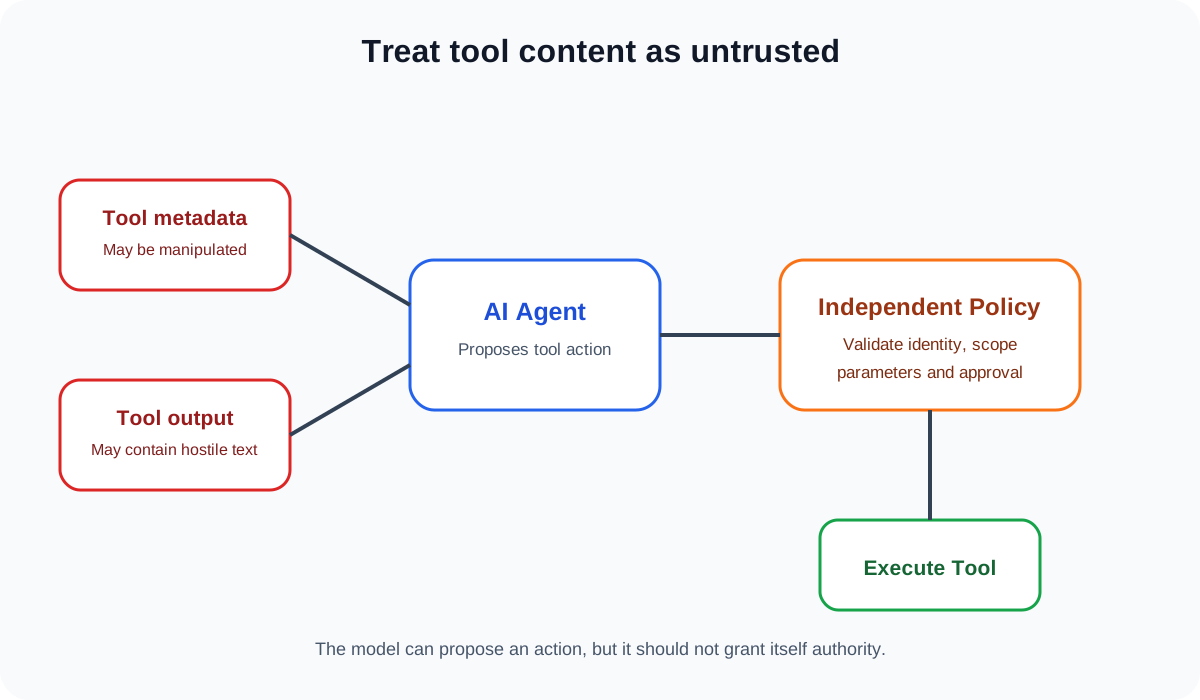
Data returned by a tool is data, not authority.
The model may use it as evidence or context, but it should not be allowed to turn that content into new permissions.
Do not let the model enforce its own tool policy
A weak architecture says, in the system prompt, “Never send confidential data to external recipients.”
A stronger architecture also enforces that rule outside the model.
For example, before the email tool executes, a policy layer can inspect:
- authenticated user;
- agent identity;
- recipient domain;
- data classification;
- requested action;
- whether the action is within the user’s delegated scope;
- whether approval is required.
The model can propose the action, but a deterministic control decides whether the action is allowed.
OWASP’s 2026 Agent Control Standard moves in this direction by defining runtime hooks through which policies can be applied and agent behavior can be observed and controlled.
This design is especially important for high-impact tools.
Split read tools from write tools
One of the simplest improvements is to separate capabilities by impact.
A read-only document search tool should not share the same permission model as a tool that deletes files. A customer-support lookup tool should not automatically include the ability to refund payments. A code-analysis agent should not receive unrestricted shell access if it only needs to inspect source files.
Useful categories include:
| Tool class | Example | Typical control |
|---|---|---|
| Read-only | Search documents | Narrow data scope |
| Low-impact write | Create draft | Audit and validation |
| External communication | Send email | Recipient and content policy |
| Financial | Initiate payment | Strong approval |
| Administrative | Modify users | Step-up authentication and explicit authorization |
| Execution | Run command | Strict allowlist or isolation |
The purpose is not to create a perfect universal taxonomy. It is to stop every tool from being treated as equally harmless.
Pin and verify trusted tool sources
Tool poisoning can also be a supply-chain problem.
If an organisation loads tools, plugins or MCP servers from third parties, it should know exactly what is being trusted. Depending on the environment, controls can include:
- approved source lists;
- version pinning;
- package integrity verification;
- signed releases where available;
- configuration review;
- change monitoring;
- dependency scanning;
- isolation between tools with different trust levels.
This is consistent with the wider principles in AI Supply Chain Security.
A tool that was safe last month should not be assumed safe forever simply because its name has not changed.
Validate tool parameters before execution
Even when tool selection is legitimate, generated parameters can be dangerous.
Suppose an agent chooses a file-deletion function and provides a path. The backend should not assume the path is safe just because the model generated it. The tool implementation should still validate that the path is within an allowed directory and that the user is authorised to delete that resource.
The same principle applies to SQL queries, URLs, email addresses, cloud resource identifiers and command arguments.
Security controls should be attached to the actual action, not only to the model’s intention.
Require stronger approval for high-impact actions
Human approval can be useful, but only when the approval is meaningful.
A prompt that says “The agent wants to perform an action. Approve?” is weak because the user does not know exactly what will happen.
A better approval displays the important action details, such as:
- destination account;
- amount;
- recipient;
- resource being deleted;
- permission being granted;
- external domain receiving data.
The approval should be bound to that exact action. If the action changes, the previous approval should not silently carry over.
This reduces the chance that a poisoned tool or malicious document can hide a dangerous operation behind a vague confirmation.
Log tool selection and execution separately
Good audit logs make it easier to determine where the manipulation happened.
For sensitive operations, record enough context to answer:
- which user initiated the task;
- which agent handled it;
- which tools were available;
- which tool the model selected;
- what normalized parameters were proposed;
- what policy decision was made;
- whether a human approved the action;
- what the tool actually executed;
- what result was returned.
Avoid logging secrets or unnecessary personal data. The objective is to preserve the security story of the action.
Test tools as adversarial inputs
Security testing should not focus only on user prompts.
Agent testing should include malicious or misleading:
- tool names;
- tool descriptions;
- schemas;
- returned documents;
- API responses;
- error messages;
- metadata;
- nested tool outputs.
OWASP’s AI Agent Security Cheat Sheet recommends abuse-case testing for tool misuse, privilege escalation, memory poisoning and data exfiltration.
A useful test is to assume that one low-trust tool is fully attacker-controlled and ask whether it can cause the agent to reach a higher-impact tool.
If the answer is yes, the architecture needs an independent control boundary.
A safer tool architecture
A practical design can follow this sequence:
- Register tools through an approved inventory.
- Authenticate the tool source or server.
- Give the agent only the tools needed for the current task.
- Mark tool output as untrusted data.
- Let the model propose a tool call.
- Normalize and validate the parameters.
- Apply an external authorization and policy check.
- Require action-specific approval for high-impact operations.
- Execute with a short-lived, narrowly scoped credential.
- Log the decision and result.
This does not eliminate model risk. It limits how far a model failure can travel.
Common mistakes
Tool-integrated agent systems deserve extra scrutiny when they:
- load arbitrary tools from unreviewed sources;
- accept tool descriptions that can change dynamically without monitoring;
- give every agent the same broad service account;
- allow tools to return text that can grant new authority;
- rely entirely on system-prompt rules for authorization;
- combine read, write, financial and administrative capabilities in one unrestricted tool set;
- auto-approve generated actions;
- fail to validate tool parameters;
- log only the final result without the policy decision.
These mistakes are attractive during prototyping because they reduce friction. They become dangerous when the agent begins operating on real systems.
Tool poisoning is ultimately a trust-boundary problem
The most useful mental model is not “Can the model spot a malicious tool description?” It is “What happens if the model fails to spot it?”
If one poisoned description, malicious document or compromised integration can cause the agent to perform an irreversible privileged action, too much security responsibility has been placed inside the model.
A safer design assumes that models can be manipulated. Tool identities are controlled. Tool inventories are constrained. Outputs are treated as untrusted. Authorization is enforced outside the model. High-impact actions receive stronger controls. Runtime behavior is observable.
That turns tool poisoning from a potentially system-wide compromise into a more containable security event.