Using one password for many accounts is easy to remember, but it creates a dangerous dependency. If that password is exposed in one breach, an attacker can try it against your email, social media, cloud storage and other services. Creating a different strong password for every account solves that problem in theory, but very few people can realistically remember dozens of unrelated credentials.
That is the problem password managers are designed to solve.
The short answer is: a well-designed password manager, used correctly, is generally safer than memorising a small set of reused passwords. NIST now explicitly recommends password managers for accounts that still require passwords, and the UK’s National Cyber Security Centre says that although password managers introduce risks, their benefits outweigh those risks overall.
The important part is understanding what a password manager protects, what it cannot protect, and why the vault itself deserves stronger security than an ordinary account.
What a password manager actually does
A password manager stores account credentials in a protected vault and retrieves the appropriate credential when you need to sign in. Most modern managers can also generate long, random passwords so you do not need to invent them yourself.
This changes the way password security works.
Without a manager, people often optimise for memorability. That can lead to reused passwords, predictable patterns or small variations such as changing a number at the end. With a manager, each website can receive a separate randomly generated password that has no relationship to the passwords used elsewhere.
NIST SP 800-63B-4, published in August 2025, requires services to allow the use of password managers and autofill. NIST also notes that password managers can increase the likelihood that users choose stronger passwords, particularly when the manager includes a password generator.
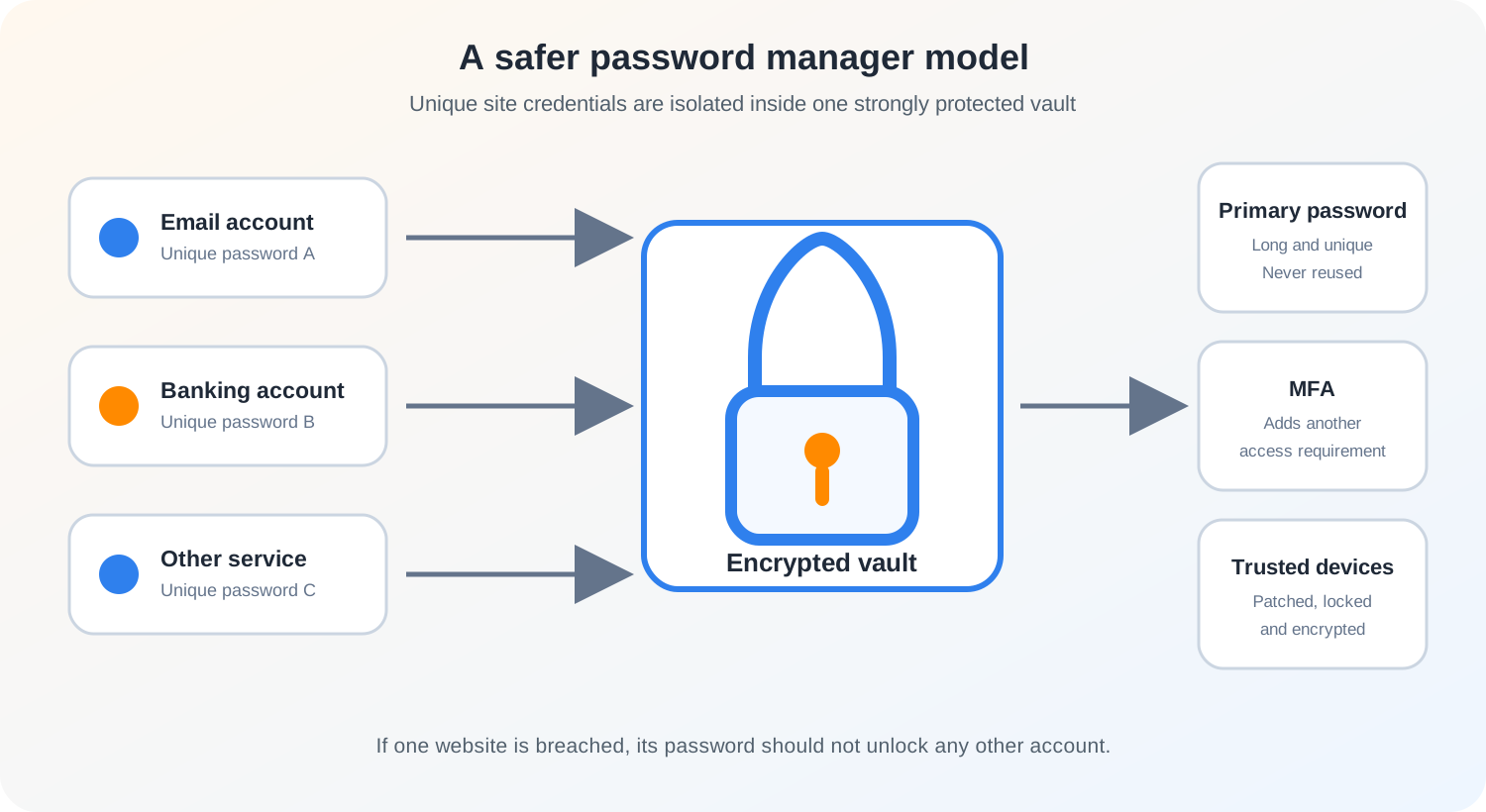
That matters because the main benefit is not simply that the vault is encrypted. The larger security improvement is credential isolation: a breach of one website should not reveal a password that works on another website.
This is especially useful after incidents such as those discussed in what to do after your data appears in a data breach. If every account has a unique password, one leaked credential has a much smaller blast radius.
Does putting all your passwords in one place create a single point of failure?
Yes, and that is the strongest argument against password managers.
A password vault contains highly valuable information. If an attacker gains access to an unlocked vault, or obtains whatever is necessary to decrypt it, many accounts may be exposed at once. The NCSC describes password managers as a natural target for attackers for exactly this reason.
But security decisions should compare complete alternatives rather than looking at one risk in isolation.
Consider two users:
| Approach | Main benefit | Main security weakness |
|---|---|---|
| Reuse one memorable password | Easy to remember | One breached password can expose many accounts |
| Memorise several predictable passwords | No central vault | Human-created patterns can be guessed or reused |
| Store passwords in an unprotected note or document | Convenient | Anyone who gets the file may read the credentials directly |
| Use a well-secured password manager | Unique random passwords become practical | The vault becomes a high-value asset that must be strongly protected |
The password manager does concentrate risk, but it can also remove password reuse across dozens of services. For most people, that trade is favourable when the vault is properly secured.
How are passwords protected inside the vault?
A competent password manager should not store vault contents as readable plain text at rest.
The NCSC recommends that stored credentials be protected with strong encryption. It also advises that, ideally, only the user should possess the decryption material needed to access the stored credentials. For cloud-synchronised managers, the provider should not simply be able to read the user’s vault whenever it wants.
The exact cryptographic design differs between products. Some derive encryption keys from a primary password, some combine that with additional device or account secrets, and some use platform security hardware. A useful evaluation question is therefore not just, “Does it use encryption?” Almost every serious product will say yes.
Better questions are:
- What protects the vault when it is stored on the device or in the cloud?
- How is the encryption key derived and protected?
- Can the service provider decrypt the vault?
- What happens if the provider’s servers are breached?
- How does a new device become authorised?
- How does account recovery work?
- Has the security design been independently reviewed or clearly documented?
Encryption is only one part of the system. Authentication, recovery, device security, software updates and secure implementation are equally important. My article on cryptographic failures explains why using a strong algorithm does not automatically make the surrounding system secure.
The primary password matters more than ordinary passwords
A password manager normally asks for a primary password, sometimes called a master password. This credential deserves special treatment because it protects access to the vault.
Do not reuse it anywhere else.
A good primary password should be long, memorable to you, difficult for someone else to guess and unique to the password manager. You do not need to create an impossible string of symbols if the manager supports a long passphrase. The important properties are length, unpredictability and uniqueness.
NIST’s current public guidance recommends password managers and says that, when users must create a password themselves, length is especially important. NIST SP 800-63B-4 also moved away from arbitrary composition rules and periodic password changes, while emphasising longer passwords, compromised-password blocklists and rate limiting.
Your vault password is one of the few credentials you may actually need to remember. It should never be stored as another ordinary entry inside the same vault without a separate recovery strategy.
Use multi-factor authentication on the password manager account
If the password manager supports multi-factor authentication, enable it.
The NCSC specifically recommends MFA for cloud-sync password managers and for vaults containing privileged or sensitive accounts. NIST’s consumer guidance also recommends choosing a password manager that supports MFA.
MFA does not make the vault invulnerable. For example, malware running on an already unlocked device may attack the endpoint rather than the online login process. But MFA can make remote account takeover substantially harder when an attacker only has the primary password.
Where available, prefer phishing-resistant authentication methods such as passkeys or hardware security keys for the password manager account. The NCSC notes that passkeys reduce the effectiveness of phishing because they are bound to the legitimate service rather than being reusable secrets that a user can type into a fake site.
Can autofill help against phishing?
It can, but only if the password manager matches credentials to the correct site.
A human may see a convincing fake login page and type a password into it. A properly designed password manager knows the domain for which a credential was saved and should not offer that credential to an unrelated site. The NCSC specifically identifies this as a useful protection and says a manager should only offer credentials for the site to which they belong.
That makes unexpected autofill behaviour a useful warning signal.
Suppose you normally sign in to a service and your password manager automatically offers the saved login. One day you follow a message link to a similar-looking page and the manager does not offer the credential. Do not immediately copy the password from the vault and paste it into the page. First verify the domain carefully.
Password managers therefore complement the habits described in how to recognise a phishing email. They do not replace human verification, but correct domain matching can remove one common pathway for credential theft.
What if the password manager company gets breached?
A provider breach is serious, but the effect depends on what the attacker obtains and how the vault is designed.
There is an important difference between stealing encrypted vault data and obtaining immediately readable passwords. If a cloud service is designed so that the provider does not possess the user’s decryption key, a server compromise should not automatically reveal every stored password in plain text.
However, encrypted data can still be valuable to an attacker. Weak primary passwords, poor key derivation, implementation flaws, stolen account metadata or compromised devices can change the risk. This is why users should not treat the phrase “end-to-end encrypted” as the end of the evaluation.
After any confirmed security incident involving your password manager provider, read the provider’s official advisory carefully. Determine what data was involved, whether encrypted vaults were exposed, whether authentication tokens or account details were affected, and what remediation the provider recommends. Avoid relying only on social-media summaries.
If there is credible evidence that your vault credentials or decrypted vault contents were compromised, protect the password manager first, then rotate the most sensitive stored credentials. The recovery principles in what to do if an online account gets hacked are useful here: regain control, secure recovery channels, revoke suspicious sessions and then work outward to dependent accounts.
The device can be the weakest part of the system
A strong vault cannot fully protect you from a compromised endpoint.
If malware can read your screen, capture keystrokes, manipulate the browser or access an already unlocked session, the attacker may bypass protections that work perfectly while the vault is locked. This is a general security limitation, not a unique flaw in password managers.
Protect the devices where your vault is available:
- install operating system and browser security updates promptly;
- keep the password manager application and extensions updated;
- use device encryption and a secure screen lock;
- avoid installing untrusted browser extensions and software;
- lock the vault automatically after a sensible period of inactivity;
- remove old devices that no longer need vault access.
The NCSC buyers guide also recommends checking how vendors handle vulnerability disclosure and software updates. A password manager is security software, so its patching process matters.
Recovery is a security feature and a security risk
Account recovery is one of the most overlooked parts of password manager security.
A system with no recovery path can be very resistant to certain forms of provider-assisted takeover, but losing the primary password or required recovery material could permanently lock the user out. A system with convenient recovery may be easier to live with, but that recovery mechanism can become another route to the vault.
The NCSC advises organisations to understand exactly how recovery works and who is able to trigger it. That is good advice for individual users too.
Before committing your digital life to a vault, learn the recovery process while you still have access. Know whether recovery depends on a recovery code, another trusted device, an organisation administrator, a family member, a hardware key or the service provider.
Then protect that recovery method separately. A recovery code stored only inside the vault it is supposed to recover is not a useful recovery plan.
Be careful with password exports
Many password managers allow you to export your vault so you can migrate to another product or keep a backup.
Exports can be useful, but they can also turn a strongly protected vault into a plain text file containing every credential. The NCSC explicitly warns about this risk and recommends protecting and auditing export functions in organisational environments.
For personal use, treat an unencrypted export as highly sensitive temporary data. Do not leave it in Downloads, email it to yourself, upload it to ordinary cloud storage or keep it indefinitely on a shared computer. If you create an export for migration, remove unnecessary copies once the migration has been verified.
Browser password manager or dedicated password manager?
There is no universal answer.
The NCSC recognises both built-in and standalone password managers. Modern operating systems and browsers often include credential managers that can generate passwords, synchronise them across trusted devices and manage passkeys. A dedicated third-party manager may offer broader cross-platform support, family or enterprise features, more detailed auditing, different recovery models or stronger separation from a single browser ecosystem.
The right choice depends on your threat model and workflow.
For a typical individual, a reputable built-in manager that is kept updated and protected by strong device and account security may be a major improvement over password reuse. A person working across several operating systems may value a dedicated cross-platform manager. An organisation may need administrative controls, audit logs, shared-vault governance and separation between personal and work credentials.
The key question is not whether the product is built into a browser. It is whether its security architecture and operational controls are appropriate for how you will use it.
What should you check before choosing one?
Rather than relying only on feature lists or marketing claims, evaluate the controls that protect the vault.
A practical checklist is:
- Strong encryption at rest. The vendor should clearly document how stored vault data is protected.
- A design that limits provider access. Understand whether the provider can decrypt user vaults.
- Multi-factor authentication. This is especially important for cloud-synchronised vaults.
- Secure device enrolment. A new device should not gain vault access merely because someone knows an email address.
- Clear recovery behaviour. Know who can recover the account and what recovery exposes.
- Domain-aware autofill. Credentials should only be offered to the intended site.
- A strong password generator. Unique random credentials should be easy to create.
- Prompt security updates. The vendor should maintain supported clients and handle vulnerability reports responsibly.
- Safe export controls. Understand whether exports are encrypted or plain text.
- Platform support you will actually use. Security benefits disappear if poor compatibility pushes you back to manual reuse.
For organisations, add policy enforcement, administrative auditability, joiner and leaver processes, role separation and secure credential sharing where sharing cannot yet be eliminated.
Should you store one-time codes in the same manager?
This is a trade-off between convenience and separation.
Keeping both a password and a time-based one-time password in the same vault can make consistent MFA use easier and reduce the chance that MFA is disabled for convenience. But if an attacker gains access to the unlocked vault, both factors may become available together.
For higher-risk accounts, stronger separation can be appropriate. A hardware security key, passkey on a protected device or separate authenticator can reduce dependence on one vault. For lower-risk personal accounts, the usability benefit of integrated MFA may still be better than not enabling MFA at all.
Security controls should be evaluated as a system. A theoretically perfect arrangement that a person cannot use consistently may perform worse in practice than a slightly less separated design that eliminates password reuse and keeps MFA enabled.
Are password managers becoming obsolete because of passkeys?
No, but their role is changing.
Passkeys remove the need to type a reusable password for services that support them. They are designed to be phishing-resistant and are stored and managed by credential managers, which are often the same systems people think of as password managers.
The NCSC describes a credential manager as the more accurate modern term because these tools increasingly manage both passwords and passkeys.
Passwords will remain necessary for many services for some time. During that transition, a credential manager can hold unique passwords for legacy accounts while also storing passkeys for newer services.
So, are password managers actually safe?
They are not risk-free, and no credible security tool should be described that way.
A password manager creates a valuable central vault, and that vault can be targeted through phishing, malware, software vulnerabilities, weak recovery processes or a compromised primary password. Those risks are real.
But the alternative matters. Reused and predictable passwords allow one breach to spread across unrelated accounts. A properly secured password manager makes unique random credentials practical, can reduce phishing exposure through domain-aware autofill, and can centralise security checks such as reused-password warnings.
For most users, the sensible approach is not to avoid password managers because they concentrate secrets. It is to treat the password manager as critical security infrastructure: choose a reputable implementation, protect it with a unique primary passphrase and MFA, secure every enrolled device, understand recovery, keep the software updated and use generated unique credentials everywhere passwords are still required.
That gives each account a much stronger boundary. If one website fails, the password used there should stop with that website.