When an online account is taken over, the first instinct is often to change the password as quickly as possible. That is usually necessary, but it is not enough on its own.
An attacker may already have an active session, may have added a recovery method, may have connected an application, or may have used the account to reach other services. A good recovery therefore has two goals: regain control of the account and remove every practical path the attacker could still use.
The exact buttons differ between Google, Microsoft, Apple, Meta, banking platforms and other services, but the security logic is remarkably consistent.
If you think an account is hacked, start here
If you still have access, open the service directly through its official app or by typing the known website address yourself. Do not use a login link from a suspicious email, text message or direct message while you are trying to recover the account.
If you cannot sign in, use the provider’s official account recovery process. Google, Microsoft and Apple all direct compromised users toward their own recovery and security workflows rather than third-party recovery services.
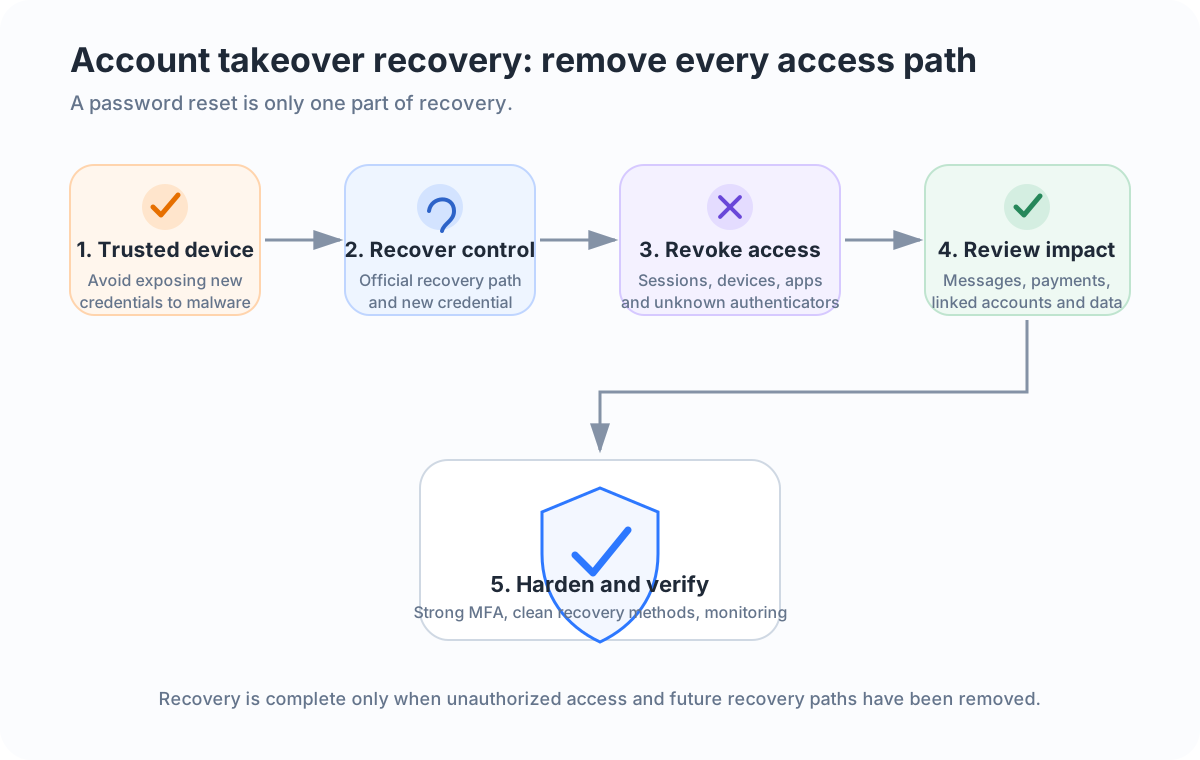
The safest sequence is:
- Move to a device you trust.
- Recover the account if you are locked out.
- Change any compromised password.
- Revoke unknown sessions, devices and authentication methods.
- Check recovery details and connected applications.
- Review what the attacker may have changed or done.
- Protect other accounts that share credentials or depend on the compromised account.
- Enable stronger multi-factor authentication.
- Monitor the account for further suspicious activity.
That order is more useful than treating a password reset as the finish line.
First, decide whether you have evidence of compromise
Not every strange event proves that someone has taken over an account. A failed login notification, an unexpected password-reset email or an unfamiliar city in a sign-in log can have innocent explanations.
Evidence becomes stronger when you see successful activity that you cannot explain, such as:
- a successful sign-in from an unknown device;
- a password, recovery email or phone number changed without you;
- a new authenticator, passkey or trusted device that you did not add;
- messages, posts, purchases or account actions you did not make;
- an active session on a device you do not recognize;
- connected apps or permissions you did not approve;
- being locked out after account details were changed.
Apple currently lists unrecognized sign-ins, unexpected two-factor authentication codes, unknown devices, changed account details and purchases you did not make among signs that an Apple Account may have been compromised. Google’s hacked-account guidance similarly tells users to review recent security events and devices for activity they do not recognize.
The important distinction is between a suspicious signal and evidence that someone successfully authenticated or changed the account.
Step 1: Use a trustworthy device
If the compromise may have started because of malware, a malicious browser extension or a device that somebody else controls, changing a password on that same unsafe device can expose the new credential immediately.
Microsoft’s current recovery guidance for a compromised Microsoft account explicitly recommends checking a potentially infected PC for malware before changing the password.
For an ordinary consumer account, a sensible approach is to use a known, updated device. If the original computer behaves suspiciously, update its operating system and security software, remove unknown extensions or applications, and run an appropriate security scan before trusting it with new credentials.
Do not install random “account recovery” or “hacker removal” tools suggested by strangers. Account recovery should stay within the provider’s official process.
Step 2: Regain control through the official recovery path
If you are locked out, go directly to the provider’s account recovery page.
The provider may ask you to prove ownership using an existing recovery email, phone number, trusted device, recovery code or other information already associated with the account. Follow that process carefully and avoid repeatedly changing answers just to get through it.
If the attacker changed your recovery details, use the provider’s compromised-account or recovery workflow rather than creating a second account and assuming the first one is lost.
The US Federal Trade Commission also advises users who cannot sign in to follow the provider’s account recovery instructions.
Step 3: Change the compromised password, but make it genuinely new
If the account uses a password and there is evidence that it was exposed, replace it with a new password that is not used anywhere else.
Do not make a small variation such as changing Summer2025! to Summer2026!. If an attacker knows the old password, predictable variations are easy to try.
If the same password was reused on other services, those accounts should be treated as exposed too. Change the most important ones first, especially email, banking, cloud storage, social media and accounts that can reset other credentials.
NIST SP 800-63B-4 treats a compromised authenticator as something that should be invalidated promptly. The practical lesson is simple: once a credential is known to be compromised, do not continue trusting it.
A password manager can help create and store unique credentials so one breach does not become a chain of account takeovers.
Step 4: Sign out unknown sessions and devices
A password change may invalidate existing sessions, but you should not assume that every service behaves the same way.
Look for settings named Devices, Sessions, Where you’re signed in, Recent activity or something similar. Remove devices you do not recognize and use a sign-out-everywhere option if the provider offers one and the situation warrants it.
This step matters because many modern services use session cookies or tokens after the initial login. If the attacker already has a valid session, merely thinking about the password can miss the access path that is currently active.
After revoking sessions, sign back in only on devices you trust.
Step 5: Inspect recovery methods and authentication settings
An attacker who wants to keep access may try to add something under their control, such as:
- a recovery email address;
- a recovery phone number;
- an authenticator app;
- a passkey;
- a security key;
- a trusted device;
- an application-specific password.
Remove anything you did not add. Also verify that your own recovery details are current.
This is one reason account recovery should be thought of as credential cleanup, not only a password change. NIST’s authenticator lifecycle guidance specifically addresses invalidating authenticators that are compromised or no longer under the subscriber’s control.
Step 6: Review connected applications and permissions
Many accounts act as identity providers for other services through buttons such as “Sign in with Google” or “Sign in with Microsoft.” They may also grant third-party applications permission to read files, contacts, mail or profile information.
Review connected apps, delegated access and OAuth permissions where the service exposes them. Remove applications you do not recognize or no longer need.
A malicious or over-privileged application can matter even after the main password changes, depending on what access was granted and whether the provider revokes those tokens during recovery.
The principle is the same as cleaning active sessions: remove every access path you cannot justify.
Step 7: Check what the attacker actually did
Recovery is not complete until you understand the likely impact.
Review the service’s activity history, security notifications and recent actions. What you need to inspect depends on the account:
| Account type | Important post-compromise checks | Why it matters |
|---|---|---|
| Forwarding, inbox rules, sent mail, recovery settings, connected apps | Email can be used to reset many other accounts | |
| Social media | Posts, DMs, linked apps, ad accounts, profile and recovery changes | Attackers may impersonate you or target contacts |
| Shopping | Orders, saved addresses, payment methods, gift cards | Unauthorized purchases or delivery changes may occur |
| Cloud storage | Shared files, deleted files, links, connected apps | Sensitive data may have been viewed or shared |
| Banking or payment | Transactions, beneficiaries, contact details, devices | Financial loss can require immediate provider action |
This table is a triage guide, not evidence that any particular action occurred. Only the service’s actual logs, alerts and records can show what happened in a specific account.
For email specifically, see How to Tell If Your Email Account Has Been Hacked. For suspicious mobile behavior, see How to Tell If Your Phone Has Been Hacked.
Step 8: Protect accounts connected to the compromised one
Account takeover often spreads through relationships between accounts.
If an attacker controls your primary email, they may request password resets elsewhere. If your social media account has saved payment information, they may try purchases or advertising charges. If the compromised password was reused, credential stuffing can turn one exposed password into several account takeovers.
Prioritize accounts in this order:
- Primary email and identity accounts.
- Banking, payment and shopping accounts with saved payment methods.
- Cloud storage and accounts containing sensitive information.
- Social media and messaging accounts that could be used to impersonate you.
- Other accounts using the same or a similar password.
Look for password-reset confirmations, new-device notices, changed recovery information and transactions you did not initiate.
If money moved or a financial account was affected, contact the financial institution through an official channel promptly. Do not rely on contact information supplied inside a suspicious message.
Step 9: Enable stronger multi-factor authentication
After regaining control, turn on multi-factor authentication if the service supports it.
MFA is valuable because a stolen password alone is then insufficient for login. CISA recommends enabling MFA and, for organizations, aiming for phishing-resistant methods where practical.
Not every MFA method offers the same protection. NIST notes that ordinary one-time passwords are not phishing-resistant. A convincing phishing site can sometimes relay a manually entered code in real time.
Where supported and appropriate, passkeys or FIDO/WebAuthn security keys provide stronger resistance to phishing because authentication is bound to the legitimate service. An authenticator app is still an important improvement over password-only access for services that do not offer phishing-resistant methods.
Keep backup and recovery methods secure. Strong MFA is much less useful if an attacker can simply reset it through a weak recovery channel.
For background on how phishing steals credentials, see What Is Phishing?. SMS and phone-based social engineering are covered in Smishing and Vishing Explained.
Step 10: Warn people if the account was used to impersonate you
If the attacker sent messages, posted fraudulent content or asked contacts for money, warn affected people using a channel you now trust.
Keep the warning simple: tell them the account was compromised, identify the approximate period of suspicious activity, and ask them not to follow links, open unexpected files, send money or provide credentials from those messages.
Do not overstate what happened. If you do not know whether a contact clicked a link, say the message was unauthorized rather than claiming that their device was infected.
What if the account contains financial or identity information?
A compromised account can become more than a login problem if it contains card details, identity documents, tax information, private files or other sensitive data.
Google’s current compromised-account guidance tells users to consider contacting their bank or local authorities when financial or identity information may have been affected. The FTC also points people toward IdentityTheft.gov when stolen personal information may be used for identity theft.
The right response depends on what data was actually exposed and what actions occurred. Avoid assuming the worst without evidence, but do not ignore confirmed unauthorized transactions or identity changes.
What not to do after an account takeover
A few mistakes can make recovery harder:
- Do not pay a stranger who claims they can hack the account back. Use official recovery channels.
- Do not keep using a reused password. Change it everywhere it was reused.
- Do not approve unexpected MFA prompts. An attacker may be trying to complete a login.
- Do not stop after changing the password. Review sessions, recovery methods and connected apps.
- Do not click recovery links from suspicious messages. Navigate directly to the provider.
- Do not delete all evidence immediately. Security alerts, login history and transaction records may help you understand the incident or report fraud.
A practical recovery model
It helps to think about account takeover as four security questions:
Can the attacker still authenticate?
Change compromised credentials and remove unknown authenticators.
Can the attacker stay logged in?
Revoke sessions and unknown devices.
Can the attacker regain access later?
Check recovery methods, delegated access and connected applications.
Did the attacker use this account to reach something else?
Review linked services, transactions, messages and password resets.
Those questions turn recovery from a single password reset into a structured incident response process.
How do you know when recovery is complete?
You can never prove a negative with absolute certainty, but you can reach a reasonable level of confidence.
A well-recovered account should have:
- a new unique credential or secure passwordless sign-in method;
- only recognized devices and active sessions;
- only your recovery methods and authenticators;
- no unexplained third-party application access;
- MFA configured appropriately;
- no unresolved unauthorized activity;
- dependent accounts checked where the compromise could have spread.
Continue watching security notifications for a while after recovery. A new unknown login or recovery attempt may show that another credential, device or connected account still needs attention.
The most important lesson
A hacked account is an identity and access problem, not merely a password problem.
The recovery process should remove compromised credentials, invalidate unauthorized access, inspect persistence mechanisms, understand what happened, protect connected services and then strengthen authentication. That approach matches the direction of current guidance from NIST, the FTC and major account providers.
If you only remember one rule, remember this: after regaining access, ask what else the attacker could still use. That question is what turns a quick password reset into a complete recovery.
Sources and further reading
- NIST SP 800-63B-4: Authentication and Authenticator Management
- FTC Consumer Advice: Email or social media hacked? Here’s what to do
- CISA: Turn On MFA
- Google Account Help: Secure a hacked or compromised Google Account
- Microsoft Support: How to recover a hacked or compromised Microsoft account
- Apple Support: If you think your Apple Account has been compromised