A data breach notification can be unsettling, especially when it says that information linked to you may have been accessed, copied or published. The first reaction is often to change every password immediately or assume every account is already compromised.
A better response is more deliberate: find out exactly what was exposed, then protect the systems that information can be used against.
An exposed email address is not the same risk as an exposed password. A leaked card number needs a different response from a leaked identity document. And a breach does not automatically mean that someone has already taken over your accounts.
The goal after a breach is therefore not panic. It is containment, credential protection, fraud detection and recovery planning.
First, confirm that the breach notice is genuine
Breaches often create a second security problem: phishing.
Attackers know that people who have just heard about a breach are more likely to react quickly. A fake message can imitate the affected company and ask you to “verify your account”, “claim compensation” or “reset your password” through a malicious link.
The US Federal Trade Commission advises people not to trust unexpected links or phone numbers in messages that claim to be from a company. Instead, contact the organisation through a website, application or phone number you already know is legitimate.
So before doing anything else:
- Open the company’s official website or app yourself.
- Look for its breach notice, security advisory or customer support information.
- Confirm whether your account, service or data type is actually affected.
- Do not provide additional sensitive information merely because an email asks for it.
This is the same principle discussed in my guide to recognising phishing emails: urgency should make you verify the message more carefully, not less carefully.
Step 1: identify exactly what information was exposed
The phrase “your data was breached” is too broad to determine the correct response.
Read the official breach notice carefully. Look for the specific categories of information involved. The difference matters because stolen information is useful to attackers in different ways.
| Exposed information | Main follow-up risk | Priority response |
|---|---|---|
| Email address or phone number | Targeted phishing, spam, impersonation | Be more suspicious of messages that reference the breached service |
| Password or password hash | Credential stuffing and account takeover | Change the password and every reused or similar password |
| Recovery email, phone or security answers | Password-reset abuse | Review recovery settings and replace weak recovery answers |
| Payment card details | Fraudulent card transactions | Contact the card issuer, monitor transactions and follow issuer guidance |
| Bank account information | Financial fraud or social engineering | Contact the bank through an official channel and monitor activity |
| Government ID or identity data | Identity fraud | Follow the relevant identity authority or credit protection process in your country |
| Session token or active credential | Account access without the password | Revoke sessions, sign out other devices and rotate affected credentials |
This classification step prevents two opposite mistakes. The first is doing too little after a serious credential or identity exposure. The second is taking unnecessary actions that do not match the data that was actually involved.
Step 2: if a password was exposed, treat reuse as the bigger problem
If the breached service says passwords were exposed, change that password promptly.
Then ask a more important question: where else did I use the same password, or a slightly modified version of it?
Attackers can use credentials from one breach to attempt logins against unrelated services. This is called credential stuffing. A password that was unique to the breached site limits that follow-up risk. A reused password turns one breach into a possible entry point to several accounts.
The FTC specifically recommends changing the breached password and any same or similar passwords used elsewhere. Google Password Manager similarly warns that exposed username and password combinations should be changed and recommends a unique password for each account.
Prioritise accounts in this order:
- your main email account;
- banking and payment services;
- cloud storage;
- social media and messaging;
- work or school accounts;
- any account that can reset other accounts.
Your email deserves special attention because password-reset links for many other services are delivered there. My guide on how to tell if your email account has been hacked explains the account signs and settings worth checking.
Step 3: turn on stronger authentication
Changing a password removes one known credential, but it does not make the account immune to future phishing or another password leak.
Enable multi-factor authentication or two-step verification where it is available. This adds another authentication requirement beyond the password. The FTC recommends MFA after a password-related breach, and the UK’s National Cyber Security Centre recommends two-step verification for important accounts such as email, messaging and social media.
Where a service offers more phishing-resistant options such as passkeys or hardware-backed security keys, consider them for high-value accounts. The exact options depend on the provider.
Also review:
- recovery email addresses and phone numbers;
- registered devices;
- active sessions;
- connected third-party applications;
- app passwords;
- API tokens or personal access tokens, if the service uses them.
If you discover signs of actual account takeover, use the account provider’s recovery process and follow the more detailed steps in what to do if an online account gets hacked.
Step 4: sign out active sessions when the exposure could support account access
A password change is not always enough by itself.
Some services maintain existing authenticated sessions after a password is changed. If an attacker already has a valid session or device authorization, that session may need to be revoked separately.
The NCSC’s hacked-account guidance recommends logging out of devices and apps after changing a compromised password. Many services provide options such as “sign out of all devices”, “manage sessions” or “remove device”.
This is especially important if the breach involved session tokens, authentication cookies, recovery credentials or other material that could provide access without knowing the new password.
Step 5: respond differently when payment or banking data is involved
If exposed data includes a payment card number, bank information or another financial credential, do not rely only on password changes.
Contact the financial institution using the number on the card, its official app or its verified website. Ask what protective action is appropriate for the specific data exposed. Depending on the circumstances, the institution may recommend monitoring, replacing a card, changing a PIN or using another fraud-control process.
Continue reviewing transactions even after a protective control is added. The FTC notes that a credit freeze can make it harder for an identity thief to open new credit accounts, but it does not prevent fraudulent use of existing accounts. The broader lesson applies beyond the United States: new-account fraud protection and existing-account monitoring solve different problems.
If you see an unauthorised transaction, report it to the provider promptly through its official channel.
Step 6: take identity data more seriously than ordinary contact details
A leaked email address can increase phishing risk. A leaked identity number, government document, tax identifier or similar identity material can create a longer-lasting problem because you cannot simply “change” every identity attribute like a password.
The correct process depends on your country and the type of identifier involved. Use official government, financial or identity-authority guidance for your jurisdiction.
For example, in the United States, the FTC’s IdentityTheft.gov provides tailored recovery steps, and the FTC recommends credit freezes as a way to make it harder for criminals to open new credit accounts in someone else’s name. Credit freezes are a US-specific mechanism, so readers elsewhere should use the equivalent official protection available in their own jurisdiction rather than assuming the same process applies globally.
If actual identity fraud has already occurred, keep records of:
- the breach notification;
- suspicious transactions or account changes;
- dates and times of reports;
- case or reference numbers;
- communications from providers or authorities.
These records can be useful during recovery and dispute processes.
Step 7: expect more convincing phishing after a breach
Breached data can make social engineering more believable.
Suppose an attacker knows your name, email address, phone number and the name of a service you use. A message that says, “We are contacting you about your recent account security incident” may feel more credible because the attacker is using real context.
That does not mean every post-breach message is fraudulent. It means you should authenticate the sender independently.
Be particularly cautious about messages that:
- ask for a password or one-time code;
- ask you to install remote-access software;
- demand immediate payment;
- provide a new bank account for a transfer;
- tell you to move money to a “safe” account;
- ask you to call an unfamiliar number;
- send you directly to a login page through an unexpected link.
Open the provider’s official site or app yourself. Do not use a message as your only proof that the sender is genuine.
Step 8: use a password manager to remove the reuse problem
If the breach reveals that you reused the same password across several accounts, fixing those accounts manually is only half the job. You also need a system that makes reuse unnecessary.
A reputable password manager can generate and store a unique password for each service. That means a future breach of one service does not automatically reveal the password used for another.
Password managers do not eliminate every risk. The password manager account itself needs strong protection, and recovery options must be secured. But unique credentials dramatically reduce the usefulness of one breached password against unrelated accounts.
Step 9: monitor for the risks that match the leaked data
Monitoring should be targeted.
If only an email address was exposed, watch for phishing and unusual login alerts. If card information was exposed, review card activity. If identity data was involved, monitor the relevant financial or identity systems available in your country. If credentials were exposed, review account sessions and sign-in history.
Do not assume that “dark web monitoring” can guarantee safety or confirm that your data will never be abused. Monitoring can provide useful alerts, but it cannot undo a breach or replace account controls.
The FTC advises people who receive legitimate free credit-monitoring services after a breach to consider using them. Again, the available services and legal framework vary by country.
What if the breached account was old or unused?
Do not ignore it automatically.
An old account may still contain a password you reused elsewhere, an old address, a phone number, personal profile information or recovery data. The FTC has specifically warned that an old breached password can still matter if it was reused on another account.
If the service still exists and you no longer need the account, consider securing it first and then deleting it using the provider’s official account-deletion process. Deletion does not remove copies that were already stolen, but reducing unnecessary accounts reduces your future exposure surface.
What not to do after a breach
A few reactions create more risk than they remove.
Do not pay someone simply because they claim they can “remove your data from the dark web”. Do not click a breach-notification link before confirming the source. Do not change one breached password while leaving identical passwords elsewhere. Do not assume MFA means a leaked password no longer matters. And do not provide additional identity documents to an unverified party just because they claim to be helping with the breach.
Also avoid spreading an unverified breach claim. A screenshot or social-media post is not the same as an official disclosure or a technically verified incident.
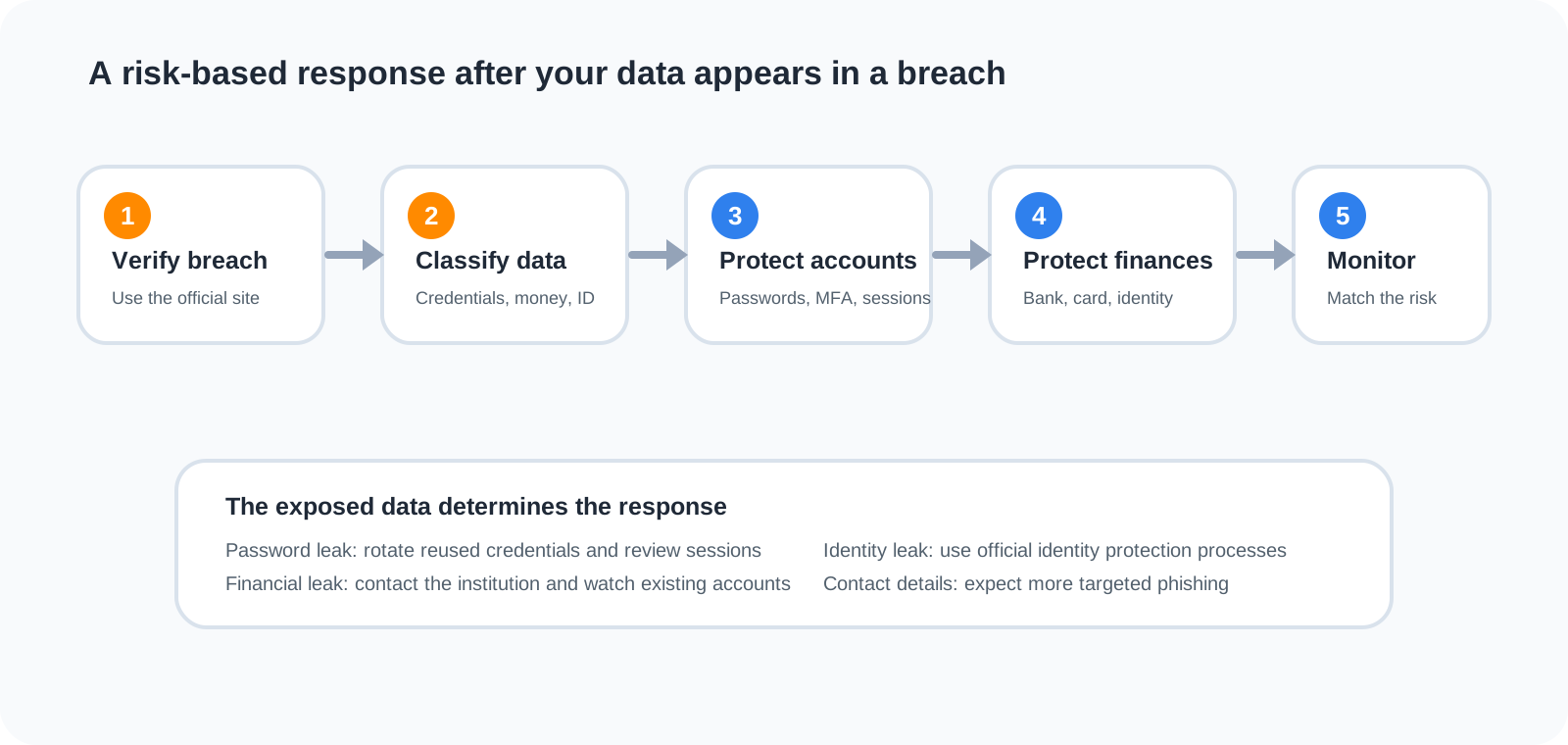
A practical breach-response order
If you want a simple sequence, use this:
- Verify the breach through an official source.
- Identify the exact data types exposed.
- Change exposed or reused passwords, starting with email and financial accounts.
- Enable stronger authentication and review recovery methods.
- Revoke suspicious or unnecessary sessions and connected access.
- Contact banks or card issuers if financial data is involved.
- Use official identity-protection processes if identity data was exposed.
- Watch for targeted phishing and account alerts.
- Keep monitoring the specific systems that match the exposed information.
The sequence is intentionally risk-based. Not every breach requires every action.
The most important lesson: reduce the value of the next breach
You cannot personally prevent every company you use from suffering a data breach. You can, however, reduce how much damage one breach can cause across the rest of your digital life.
Unique passwords limit credential reuse. Strong authentication makes a stolen password less useful. Secured recovery methods make account-reset abuse harder. Fewer unnecessary accounts reduce the amount of data stored about you. Careful verification makes breach-themed phishing less effective.
That is a more realistic security goal than trying to become “unbreachable” as an individual. Design your accounts so that one provider’s failure does not become a chain reaction across your email, finances, social media and identity.
Sources and further reading
- US Federal Trade Commission: Have you been affected by a data breach?
- IdentityTheft.gov: Report identity theft and get a recovery plan
- US Federal Trade Commission: Understanding your credit
- UK National Cyber Security Centre: Hacked accounts
- Google Account Help: Change compromised passwords
- US Federal Trade Commission: Protect your personal information from hackers and scammers