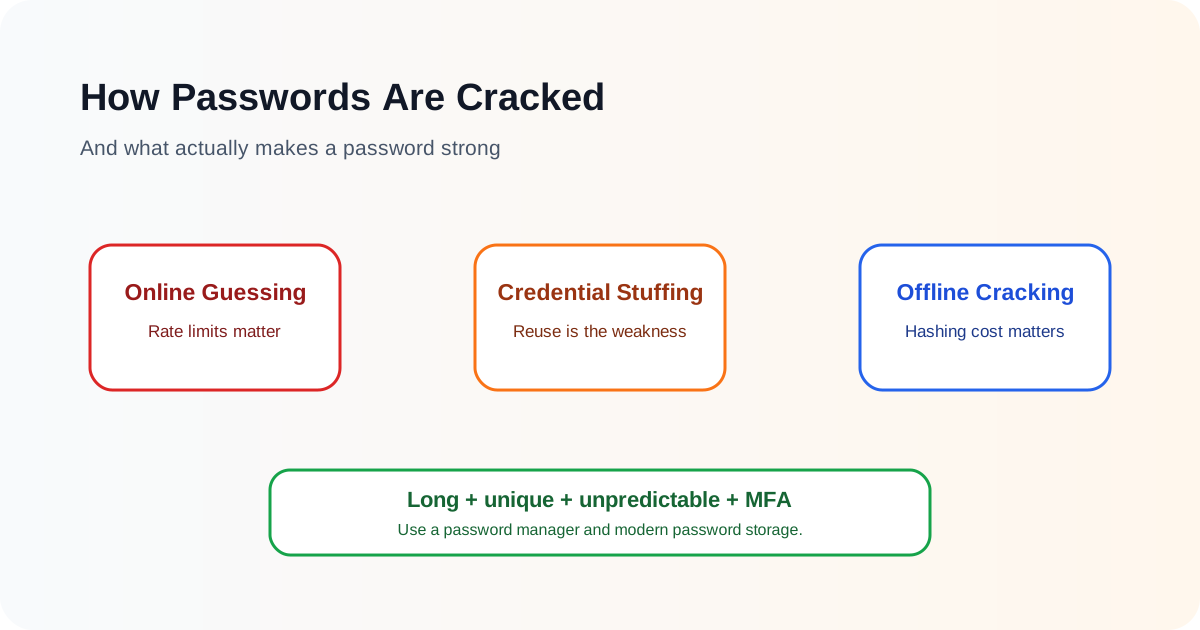
A password does not have to be “hacked” in one dramatic way. Attackers can obtain passwords through phishing, malware, data breaches, password reuse, online guessing or offline cracking of stolen password hashes. These methods have very different speeds and limitations, which is why advice such as “add a symbol” is not enough to explain password security.
The most important practical ideas are simpler: use a unique password for every important account, prefer long passwords or randomly generated passwords, use a password manager, enable MFA, and avoid passwords that appear in common or breached-password lists.
For organisations, password security also depends on secure storage and login controls. A strong user password can still be undermined if the service stores passwords badly or allows unlimited guesses.
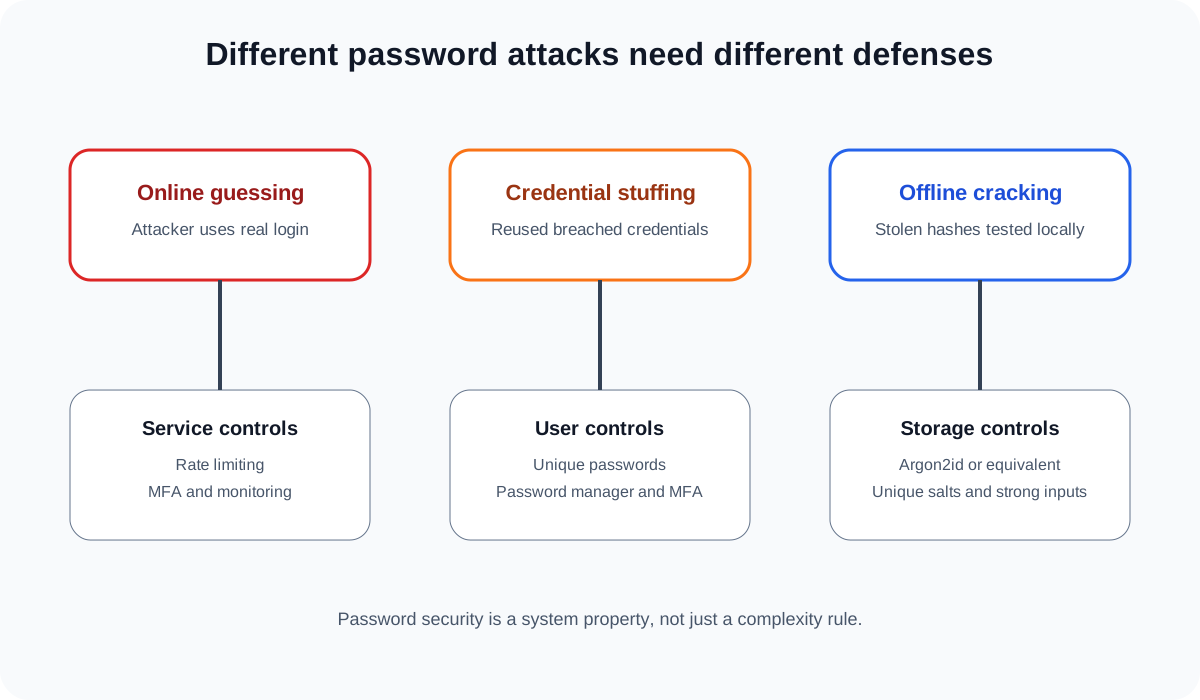
“Password cracking” can mean several different attacks
People often use the phrase password cracking for any attempt to discover a password. In practice, defenders should distinguish at least three common categories.
Online password guessing
The attacker sends login attempts to the real service. They may try many passwords against one account or a small set of common passwords against many accounts.
Because every guess passes through the website or identity provider, the defender can detect and slow the attack with rate limiting, risk-based controls, MFA and monitoring.
Credential stuffing
The attacker takes username and password combinations exposed in an earlier breach and tries them on another service.
This attack works because people reuse passwords. The attacker is not necessarily “cracking” anything. They may already possess a valid password from somewhere else.
Offline password hash cracking
If an attacker steals a database containing password hashes, they may be able to test password guesses locally without sending each guess to the real website.
The attacker calculates a hash for a candidate password using the same password-storage method and compares the result with the stolen value. If it matches, the candidate is correct.
Offline attacks can be much more dangerous than online guessing because the website’s normal login rate limits are no longer in the attack path. This is why secure password hashing is so important.
Passwords should not be stored in plaintext
A properly designed service does not need to know the user’s original password after enrolment. It stores a derived value, normally produced by a password-hashing function.
When the user logs in, the service hashes the submitted password using the appropriate parameters and checks whether the result matches the stored value.
OWASP recommends modern password-hashing algorithms designed to make guessing expensive, such as Argon2id, scrypt, bcrypt for appropriate legacy use, or PBKDF2 in environments with specific compliance needs.
Fast general-purpose hashes are not suitable for password storage simply because they are cryptographically secure hash functions. A fast function lets an attacker test more guesses per second after stealing the database.
The objective of password hashing is therefore unusual: legitimate verification should be acceptably fast, but large-scale guessing should be deliberately expensive.
What does a salt do?
A salt is a unique random value combined with each password before hashing.
Without unique salts, two users who choose the same password may have the same stored hash. Attackers can also benefit more from precomputed lookup tables.
With a unique salt, the attacker must evaluate guesses separately for each stored password. The salt does not need to be secret. Its purpose is to make precomputation and cross-account comparison less useful.
Salting does not make a weak password strong. If the password is password123, an attacker can still guess it. The salt simply changes the economics and structure of the attack.
Why weak passwords are guessed first
Attackers do not normally begin by trying every possible character combination in a perfectly random order. They use knowledge about human password choices.
Likely guesses include:
- passwords from previous breaches;
- common words and phrases;
- keyboard patterns;
- names and dates;
- service names;
- predictable substitutions such as replacing
awith@; - common suffixes such as
123, a year or!; - variations of passwords already associated with the user.
This is why a password such as Password1! can satisfy an old-style composition rule while remaining weak. It looks complex by rule, but it is highly predictable.
NIST’s current Digital Identity Guidelines therefore emphasise length, blocklists of common or compromised passwords, secure storage and rate limiting rather than forcing users to satisfy increasingly complicated composition rules.
Length usually matters more than decorative complexity
A longer password generally gives the attacker a larger space of possibilities to search, particularly when the password is not built from a common pattern.
That does not mean every 20-character password is stronger than every 12-character password. passwordpassword123! is long but highly predictable. A randomly generated 12-character value can be much harder to guess.
The practical lesson is that length and unpredictability work together.
For human-memorised passwords, a long passphrase can be easier to remember than a short string full of forced substitutions. For passwords stored in a password manager, randomly generated strings are usually a better choice because the user does not need to memorise them.
NIST SP 800-63B-4 requires at least 15 characters for passwords used as a single authentication factor and permits a lower minimum of eight characters when the password is used only as part of a multi-factor process. It also recommends supporting passwords of at least 64 characters so that users can choose long passphrases.
Why composition rules can backfire
Traditional password policies often require:
- one uppercase letter;
- one lowercase letter;
- one number;
- one symbol;
- periodic password changes.
These rules can produce predictable user behaviour. A person may transform summer into Summer1!, then later into Summer2! when forced to change it.
NIST’s modern guidance does not recommend arbitrary composition rules and does not recommend routine forced password changes unless there is evidence that the password has been compromised.
The reason is practical: security policy should make guessing harder, not simply make passwords look complicated to a human reviewer.
Blocklists are important
When a user chooses or changes a password, NIST recommends comparing it against a blocklist containing values that attackers are likely to try early.
That can include:
- commonly used passwords;
- passwords exposed in previous breaches;
- dictionary words when they are frequently used as passwords;
- the service name;
- the username and predictable variations.
If the chosen password is on the blocklist, the user should be asked to choose another one.
This is more useful than awarding a password a high score simply because it contains multiple character classes.
Online brute force is limited by the service
An attacker who guesses through the real login page must deal with whatever controls the service applies.
Defences include:
- rate limiting;
- progressive delays;
- account lockout or temporary blocking where appropriate;
- bot detection;
- suspicious-login monitoring;
- MFA;
- IP and device risk signals.
OWASP notes that throttling is a primary defence against repeated online guessing. The design must balance security with denial-of-service risk because an attacker should not be able to lock thousands of legitimate users out easily.
This is one reason online and offline attacks should not be treated as the same problem.
Offline cracking is controlled by password storage cost
If an attacker has stolen hashes, normal web rate limits no longer help. The attacker can run guesses on their own hardware.
At that point, three things become especially important:
- how predictable the user’s password is;
- which password-hashing algorithm the service used;
- how the algorithm was configured.
A slow, memory-hard algorithm makes each guess more expensive. This does not make cracking mathematically impossible, but it can change a cheap attack into a costly one.
OWASP currently recommends Argon2id for new applications where available and provides concrete configuration guidance in its Password Storage Cheat Sheet.
Developers should review those values over time rather than assuming that one configuration remains ideal forever.
Credential stuffing is mostly a password reuse problem
Suppose a shopping website is breached and a user had the password BlueRiver27 there. If the same password was also used for email, the attacker may try the same credentials against the email provider.
The email provider can have excellent password hashing and still lose the account because the attacker already knows the correct password.
This is why password uniqueness is one of the highest-value controls for users.
A unique password limits the blast radius of a breach. One compromised service does not automatically provide a key to every other account.
For practical guidance, see Password Managers Explained.
Password spraying is different from brute force
Traditional brute force may focus on one account and try many passwords. Password spraying does the opposite: the attacker tries one or a few likely passwords across many accounts.
This approach can avoid triggering simple per-account lockout rules.
Examples of weak candidates might be seasonal patterns, organisation-related terms or predictable defaults.
Defenders therefore need broader monitoring, not just a counter attached to one username. Identity systems should look for patterns across accounts, source infrastructure and devices.
Phishing bypasses password strength entirely
A strong password cannot protect a user who types it into a convincing phishing page and then gives the attacker a valid MFA code.
Password security is only one layer.
Users should therefore combine strong unique passwords with MFA and remain cautious about where they enter credentials. For important accounts, phishing-resistant authentication such as a passkey or FIDO security key can reduce reliance on passwords and one-time codes.
See Two-Factor Authentication Explained and Authenticator App vs SMS OTP for the authentication side of this problem.
Malware can steal passwords without guessing them
Infostealer malware, malicious browser extensions and keyloggers can capture credentials from the endpoint.
Again, this is not cracking in the mathematical sense. The attacker may simply steal the password before or after the user submits it.
This illustrates a larger point: a strong password cannot compensate for a fully compromised device.
Device security, software updates, browser hygiene and malware protection remain part of account security.
What actually makes a password strong?
For an ordinary user, a strong password should have four practical properties.
1. It is unique
Do not reuse it on another important service.
2. It is long enough
Prefer long passwords or passphrases rather than short passwords that merely satisfy visual complexity rules.
3. It is difficult to predict
Avoid common passwords, personal details, obvious patterns and trivial substitutions.
4. It is stored safely
Use a reputable password manager rather than keeping dozens of important passwords in plain text notes, spreadsheets or repeated patterns that you can memorise.
For accounts that support it, add MFA as another independent control.
A practical approach for users
A simple modern setup is:
- Use a reputable password manager.
- Generate a different random password for each account.
- Make the password manager’s own master password long, unique and memorable.
- Enable MFA on the password manager and primary email account.
- Prefer passkeys or security keys where available.
- Replace reused passwords, starting with email, financial and work accounts.
- Change a password when there is evidence of compromise, not simply because a calendar reminder says 90 days have passed.
This approach reduces both guessing risk and breach reuse.
A practical approach for developers
Developers and identity teams should address the server side of the problem.
Important controls include:
- never store plaintext passwords;
- use a modern password-hashing algorithm with current parameters;
- generate a unique salt per password;
- consider a properly protected pepper as defence in depth where appropriate;
- allow long passwords and passphrases;
- do not silently truncate passwords;
- check new passwords against common and compromised-password blocklists;
- rate-limit failed login attempts;
- support MFA;
- protect password reset and account recovery paths;
- monitor credential-stuffing and password-spraying patterns.
The secure design must cover registration, login, password change and recovery. A strong hashing algorithm does not help if the password-reset process can be trivially abused.
How to think about “cracking time” charts
Password-strength websites often claim that a password would take a precise number of years to crack. Treat those numbers cautiously.
The real answer depends on assumptions such as:
- whether the attack is online or offline;
- the hashing algorithm and work factor;
- the attacker’s hardware;
- whether the password follows a human pattern;
- whether it appeared in previous breach data;
- how the attacker orders guesses.
NIST explicitly notes that estimating entropy for user-chosen passwords is difficult. A single dramatic time estimate can create false confidence.
A better question is whether the password is unique, sufficiently long, not commonly known or predictable, and protected by a securely designed authentication system.
Common password myths
“Adding ! makes a password strong.” Not if the rest of the password is predictable.
“I change one character every month, so I am safe.” Predictable rotation can still be guessed and may encourage insecure patterns.
“A website hashes passwords, so the database is safe.” The hashing algorithm and configuration matter.
“MFA means password reuse is acceptable.” Reuse still increases risk and can expose accounts where MFA is absent, bypassed or weakly recovered.
“Long always means uncrackable.” Long but predictable passwords can still be weak.
“Attackers only use brute force.” Credential stuffing, phishing and malware often avoid brute force entirely.
The practical conclusion
Passwords are defeated in different ways, so they need multiple layers of defence.
Users should focus on long, unique and unpredictable passwords, preferably generated and stored by a password manager. Services should store passwords with modern slow password-hashing algorithms, reject commonly compromised values, rate-limit guesses and provide strong MFA.
The most important shift is to stop judging passwords by how complicated they look. A password is strong when realistic attack methods are expensive, reuse is eliminated, common guesses are rejected and the surrounding authentication system is designed to resist failure.