When a cyber incident happens, the first question is often technical: how do we stop it? The second question should be just as practical: who needs to know?
In Sri Lanka, the correct reporting path depends on what happened. A ransomware infection inside an organisation, a compromised website, a stolen social media account, an online financial scam and a criminal threat are all digital incidents, but they may need different forms of assistance.
The safest approach is to separate three tasks: contain the immediate risk, preserve useful evidence, then report the incident through the channel that matches the problem.
This guide is based on the current public reporting information from Sri Lanka CERT and Sri Lanka Police as checked on 31 August 2026. Reporting channels can change, so always confirm them on the official websites before submitting sensitive information.
The short answer: where should you report?
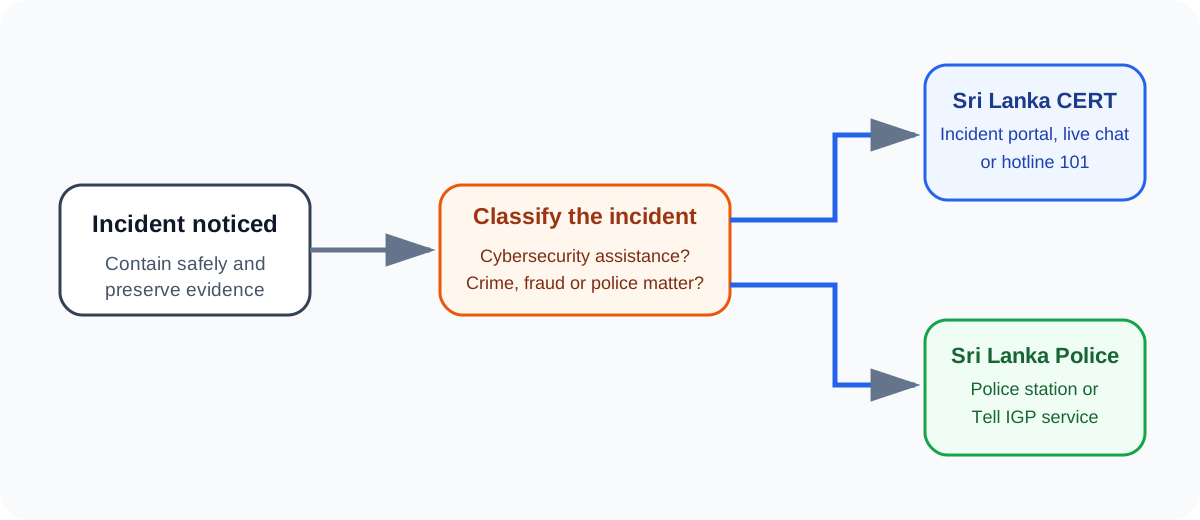
For cybersecurity incident assistance in Sri Lanka, Sri Lanka CERT is the national computer emergency response organisation and provides incident handling support. Its current incident reporting page lists the 101 hotline, an online incident reporting path and live chat support.
For matters that are also suspected crimes, fraud, threats, extortion or other offences requiring police investigation, Sri Lanka Police may also need to be involved. The Police currently provides the Tell IGP online complaints service in addition to normal police reporting channels.
A single incident can justify both. For example, an organisation affected by ransomware may need technical incident response assistance while also considering a police complaint if criminal activity, extortion or financial loss is involved.
| Situation | Practical first reporting path | Why |
|---|---|---|
| Website compromise, malware, ransomware or server intrusion | Sri Lanka CERT | Technical incident handling and coordination |
| Suspicious compromise of an online account | Sri Lanka CERT incident reporting channel | Cybersecurity assistance and guidance |
| Social media incident | Use the official Sri Lanka CERT incident reporting portal rather than relying on the general CERT email | CERT’s current incident page specifically directs social media matters to the portal |
| Personal financial fraud or scam | Use the official CERT incident portal and consider Police where a criminal complaint is appropriate | CERT’s current page directs fraud and scam matters to the portal, while Police handles criminal complaints |
| Threats, extortion, criminal impersonation or other suspected offences | Sri Lanka Police, with CERT also involved where technical assistance is useful | Criminal investigation may require police involvement |
| Organisational cyber incident with material impact | Internal incident response process plus Sri Lanka CERT, and Police or regulators where applicable | Technical, legal and operational duties may overlap |
This is a routing guide, not legal advice. Organisations in regulated sectors should also follow any sector-specific reporting duties that apply to them.
What Sri Lanka CERT currently provides
Sri Lanka CERT describes its mission as acting as a trusted national point of contact for information security and providing computer emergency response handling services.
Its current public incident page lists:
- hotline 101 for urgent cybersecurity incident reporting and assistance;
- an online incident reporting pathway;
- live chat support;
- the general contact email
cert@cert.gov.lkfor official communications and cybersecurity incident handling services.
There is an important distinction on the same page. Sri Lanka CERT currently says that incidents involving social media platforms, including services such as Facebook, WhatsApp, Telegram and Instagram, as well as personal financial fraud or scam matters, should not simply be sent to the general CERT email. Those categories are directed through the official incident reporting portal.
That is exactly why copying an old email address from an old article or social media post is a poor incident response habit. Use the current official reporting page each time.
Sri Lanka CERT also states in its privacy policy that incident information is used for incident handling and for identifying changing attack trends. It explains that coordination with third parties may sometimes be necessary, such as an internet service provider, an overseas CERT or another relevant party.
When should Sri Lanka Police be involved?
A cybersecurity incident can also be a criminal matter.
Examples include online fraud, extortion, threats, deliberate unauthorised access, identity misuse, financial theft, harassment or other conduct where criminal investigation may be necessary.
Sri Lanka Police currently operates the Tell IGP public complaints service. Police states that local and foreign nationals can submit complaints in Sinhala, Tamil or English through the online system. The service can be used for criminal offences and other matters requiring police attention, and complaints are routed to the relevant police station for investigation.
Police also states that Tell IGP complaints can be submitted through its official web service or through the email address published on the Police website. Because addresses and workflows can change, use the Police website or its E-Services section to reach the current form rather than relying on a saved link from an old message.
For an urgent physical safety issue, immediate threat or active crime, use the appropriate emergency and police channels rather than waiting for an online cyber incident form to be processed.
Do not destroy the evidence while trying to fix the problem
One of the most common incident response mistakes is to act too quickly without recording what happened.
Suppose an administrator notices an unknown login, immediately wipes the server, deletes logs, reinstalls the system and resets everything. The service may come back online, but useful evidence about the attack path can disappear.
The better approach depends on the severity of the incident, but in general preserve what you can before making destructive changes.
Useful evidence may include:
- exact date and time when the issue was noticed;
- screenshots of warnings, fraudulent messages or unauthorised changes;
- email headers where relevant;
- suspicious URLs, domains and phone numbers;
- login history and security alerts;
- relevant system, application, firewall or cloud logs;
- filenames and file hashes if malware is suspected;
- affected account names without publishing passwords or secrets;
- transaction references in a suspected financial scam;
- a simple timeline of what happened and what actions were already taken.
Do not execute suspicious files just to collect more evidence. Do not intentionally interact with an attacker beyond what is necessary for safety and reporting. If a system is business critical or the incident is serious, preserve evidence under the guidance of qualified incident responders where possible.
A practical incident reporting workflow
A useful sequence is stabilise, record, report, recover.
1. Stabilise the immediate risk
If an account is actively compromised, revoke unauthorised sessions and protect recovery methods. If ransomware is spreading, isolate affected systems from the network where this can be done safely. If a website is serving malicious content, consider taking the affected component offline while preserving logs and forensic data.
Do not make broad destructive changes simply because they feel decisive.
For account-specific guidance, see How to Tell If Your Email Account Has Been Hacked and How to Tell If Your Phone Has Been Hacked.
2. Record the incident
Write down the basics while they are still fresh:
Incident discovered: 2026-08-31 14:35 Asia/Colombo
Affected service: Example web application
Observed issue: Unknown administrator login and configuration change
First action: Revoked unknown session
Evidence preserved: Login audit log, security alert, configuration history
Current impact: Under investigation
This is an example reporting format, not fabricated scan output. The purpose is to show how a short factual timeline can make an incident report easier to understand.
Avoid assumptions. Write “unknown administrator login observed” rather than “Russian hacker entered the server” unless you actually have reliable evidence for attribution.
3. Choose the correct reporting channel
Use Sri Lanka CERT for cyber incident assistance. Use the official CERT portal when the current website directs your incident category there.
Involve Sri Lanka Police when the event may require criminal investigation or a formal police complaint. For organisations, also involve the internal legal, compliance, risk and management functions required by your incident response plan.
4. Submit facts, not theories
A useful report answers:
- What happened?
- When did you first notice it?
- Which systems, accounts or people are affected?
- Is the incident still active?
- What containment action has already been taken?
- What evidence is available?
- Is there known financial loss, data exposure, extortion or physical risk?
- What assistance are you requesting?
Do not include passwords, private keys or unnecessary sensitive data in a report unless the receiving authority explicitly requires a secure method for it.
5. Continue recovery and monitoring
Reporting is not the end of incident response.
After containment, identify the root cause, remove persistence, rotate compromised credentials, patch exploited weaknesses, restore trusted systems and monitor for recurrence.
If the incident started with phishing, review the wider account and device environment instead of only deleting the original message. The articles What Is Phishing? and Smishing and Vishing Explained explain how different social engineering channels can lead to account compromise.
What should a company do differently?
An organisation should not wait until an incident happens to decide who will contact CERT, Police, customers, management, insurers or regulators.
A basic incident response plan should define:
- who has authority to isolate systems;
- who preserves logs and forensic evidence;
- who communicates with Sri Lanka CERT;
- who decides whether a police complaint is needed;
- who handles legal and regulatory obligations;
- who communicates with customers, staff and the public;
- which vendors or cloud providers must be contacted;
- how decisions and evidence are recorded.
This reduces confusion during a real incident and helps avoid conflicting actions by different teams.
For organisations following formal security frameworks, NIST incident response guidance is also useful for building preparation, detection, response and recovery processes. Local reporting should then be integrated into that broader process rather than treated as a separate last-minute step.
What not to do after a cyber incident
Do not pay an unknown “recovery expert” from social media simply because they claim they can hack an account back. Do not publish sensitive evidence publicly in an attempt to attract help. Do not delete logs before determining whether they are needed. Do not continue using a clearly compromised credential. Do not accuse a person or organisation publicly without evidence.
Most importantly, do not delay reporting simply because you are embarrassed that the incident happened. Fast, factual reporting can make coordination and recovery easier.
A simple checklist for Sri Lankan users
If you need to act now:
- Stop the immediate harm where possible without destroying evidence.
- Record the time, affected account or system and what you observed.
- Preserve screenshots, logs, message details and relevant transaction information.
- Open the official Sri Lanka CERT website and use the current reporting route for your incident type.
- If a crime, fraud, threat or other police matter is involved, use the appropriate Sri Lanka Police reporting channel as well.
- Secure affected accounts and systems, then monitor for further activity.
- Keep the incident reference numbers and a copy of what you submitted.
Why correct reporting matters
Incident reporting is not only about asking someone else to fix the problem. It creates a reliable path for technical coordination, investigation and learning.
Sri Lanka CERT’s privacy policy explicitly notes that incident reports support both incident handling and the identification of changing attack activity. A well-documented report therefore helps the affected person or organisation while also supporting broader national cybersecurity awareness.
The key is to report the right facts to the right place. Preserve evidence, separate confirmed observations from assumptions, use current official channels and involve both technical and law-enforcement authorities when the incident requires both.